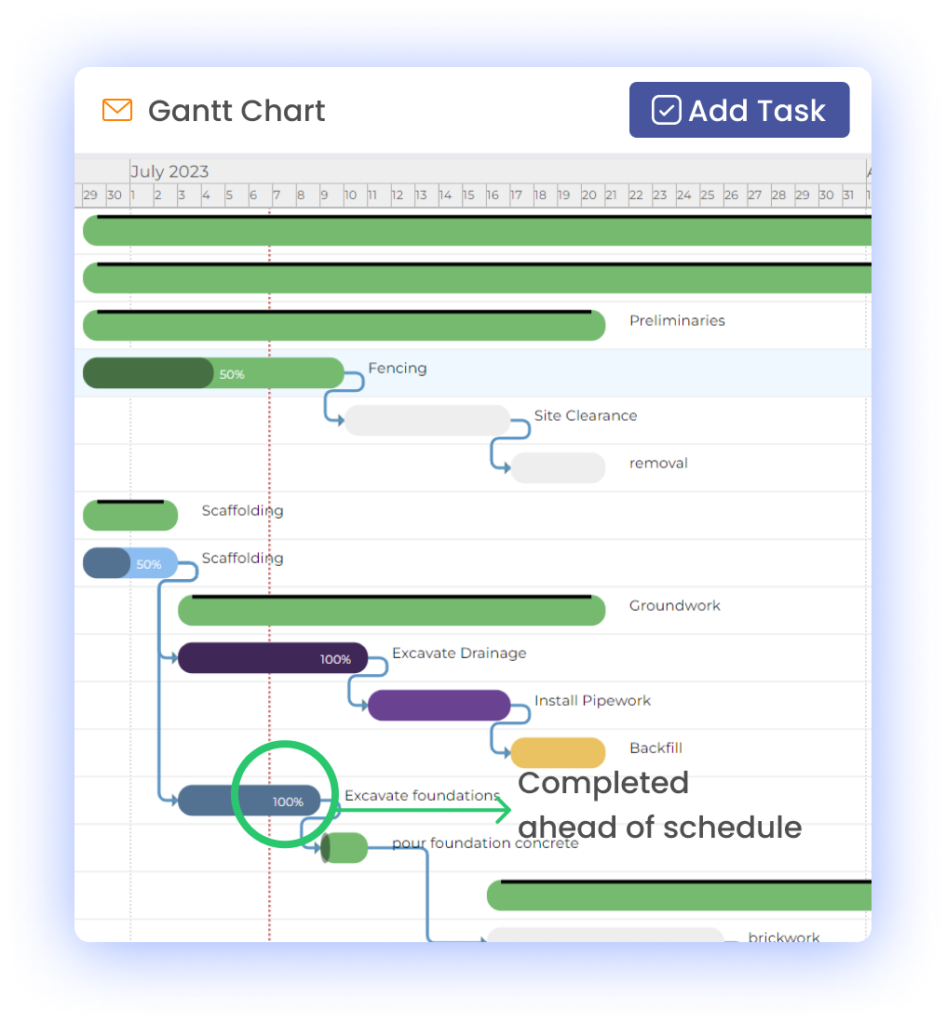
In the realm of project management, ensuring that a project stays on track and meets its deadlines is of paramount importance. However, projects often encounter roadblocks and delays, which can jeopardize the successful completion of the task at hand. These roadblocks, often referred to as "bottlenecks," can occur for a variety of reasons and can significantly impact project timelines and budgets. Identifying and addressing bottlenecks is crucial for project managers, and one valuable tool in their arsenal for doing so is the Gantt chart.
Understanding Project Bottlenecks
Before delving into how Gantt charts can be used to tackle bottlenecks, let's first define what we mean by a "project bottleneck." In the context of project management, a bottleneck is a point in the workflow or a specific task that restricts the flow of the project. This restriction can be due to various reasons, such as limited resources, dependencies between tasks, or unexpected issues that arise during the project's execution.
Project bottlenecks are problematic because they can lead to delays in the project schedule, increased costs, and even missed deadlines. To effectively manage and mitigate these bottlenecks, project managers need to have a clear understanding of where they occur and why.
Introduction to Gantt Charts
Gantt charts are visual representations of project schedules that provide a timeline view of tasks and their dependencies. Named after their creator, Henry L. Gantt, these charts have been used for over a century to plan and manage projects. What makes Gantt charts particularly valuable is their ability to display the sequence and duration of tasks in a project, allowing project managers to see the big picture and identify potential bottlenecks.
The Role of Gantt Charts in Identifying Bottlenecks
Gantt charts are incredibly useful in identifying bottlenecks because they provide a visual overview of the entire project. Here's how they help:
Dependency Visualization: Gantt charts clearly show task dependencies. When one task cannot start until another is completed, it's easy to spot these interdependencies. If a task that many others depend on gets delayed, it becomes a bottleneck.
Task Duration: Each task in a Gantt chart is associated with a duration. If a task is taking longer than expected, it's a potential bottleneck that needs attention.
Critical Path Analysis: Gantt charts can calculate the critical path of a project, which is the sequence of tasks that determines the project's overall duration. Any task on the critical path that is delayed will directly impact the project's completion time.
Addressing Bottlenecks with Gantt Charts
Once bottlenecks are identified using Gantt charts, project managers can take steps to address them:
Resource Reallocation: If a bottleneck is due to resource constraints, project managers can allocate additional resources to speed up the affected tasks.
Task Prioritization: Project managers can reorder tasks to prioritize those that are causing bottlenecks.
Task Splitting: In some cases, a task may be too large and causing a bottleneck. Project managers can divide it into smaller, more manageable sub-tasks.
Adjusting Dependencies: Reevaluating task dependencies and possibly resequencing tasks can help mitigate bottlenecks.
Best Practices for Using Gantt Charts Effectively
To make the most of Gantt charts in identifying and addressing bottlenecks, consider the following best practices:
Regular Updates: Keep the Gantt chart up-to-date with real-time data to ensure accurate tracking of task progress.
Collaboration: Share the Gantt chart with the project team to foster collaboration and transparency.
Scenario Planning: Use "what-if" scenarios to assess the impact of potential bottlenecks and develop contingency plans.
In conclusion, Gantt charts are indispensable tools for project managers seeking to identify and address bottlenecks in their projects. By providing a visual representation of tasks and their dependencies, Gantt charts empower project managers to proactively manage and mitigate potential delays, ensuring projects stay on course and within budget.
Project management is a complex endeavor that requires careful planning, resource allocation, and tracking of progress. Two commonly used tools in project management are Gantt charts and traditional timelines. Both methods have their strengths and weaknesses, and choosing the right one can significantly impact the success of a project. In this article, we will conduct a comparative analysis of Gantt charts and traditional timelines to help you make informed decisions about which approach to use in your projects.
Introduction to Gantt Charts and Traditional Timelines
Gantt Charts
Gantt charts are graphical representations of project schedules that display tasks and their respective timelines. They provide a visual overview of project activities, dependencies, and resource allocation. Gantt charts are widely used for their ability to offer a clear and detailed view of a project's progress.
Traditional Timelines
Traditional timelines, on the other hand, are simple, linear representations of project schedules. They display tasks sequentially without the complexity of task dependencies. While they lack the visual sophistication of Gantt charts, traditional timelines are straightforward and easy to create.
Advantages of Gantt Charts
Gantt charts offer several advantages:
1. Visual Clarity
Gantt charts provide a visual representation of project timelines, making it easy to understand the project's progress at a glance.
2. Task Dependencies
They allow you to depict task dependencies, showing which tasks must be completed before others can start.
3. Resource Allocation
Gantt charts help in resource allocation by showing who is responsible for each task and when they are assigned to it.
Real-World Example:
Imagine you're managing a construction project with multiple teams. A Gantt chart would help you see which tasks are dependent on the completion of others, ensuring that resources are allocated efficiently.
Disadvantages of Gantt Charts
However, Gantt charts also have limitations:
1. Complexity
They can become complex for large projects with numerous tasks, potentially overwhelming users.
2. Potential for Inaccuracy
Gantt charts may become inaccurate if updates aren't made promptly, leading to misleading information.
Real-World Example:
In large-scale infrastructure projects, managing a Gantt chart with hundreds of tasks can be challenging and time-consuming.
Advantages of Traditional Timelines
Traditional timelines have their own set of advantages:
1. Simplicity
They are simple and easy to create, making them accessible to all team members, even those without extensive project management experience.
2. Ease of Use
Traditional timelines require minimal training, making them ideal for projects where simplicity and quick setup are essential.
Real-World Example:
In a small marketing campaign with straightforward tasks, a traditional timeline can provide a clear overview of the project's progress.
Disadvantages of Traditional Timelines
However, traditional timelines also come with limitations:
1. Limited Task Relationship Visualization
They lack the ability to depict task dependencies and resource allocation, which can lead to oversight.
2. Resource Management Challenges
Traditional timelines may not help in effectively managing resources, potentially causing bottlenecks.
Real-World Example:
In software development projects with complex interdependencies, a traditional timeline may not provide sufficient visibility into task relationships.
When to Use Gantt Charts vs. Traditional Timelines
The choice between Gantt charts and traditional timelines depends on the specific needs of your project:
Use Gantt Charts When:
Your project is large and complex with many interdependent tasks.
You need detailed resource allocation and task management.
Stakeholders require a visual representation of project progress.
Use Traditional Timelines When:
Your project is small, simple, and doesn't involve extensive dependencies.
Quick setup and accessibility for all team members are crucial.
A simplified overview of project progress is sufficient.
Conclusion
In the world of project management, choosing between Gantt charts and traditional timelines is not a one-size-fits-all decision. Both have their merits and drawbacks. Understanding your project's specific requirements and complexity is crucial to making an informed choice. Gantt charts offer comprehensive project management capabilities, while traditional timelines provide simplicity and accessibility. By selecting the right tool, you can enhance your project's chances of success and ensure that your team works effectively and efficiently.
Project management is an intricate dance of tasks, timelines, resources, and dependencies. To orchestrate this dance seamlessly, project managers often turn to Gantt charts. These visual tools provide a clear overview of project schedules and help in managing project complexities. However, creating a Gantt chart is just the first step; optimizing it for efficiency is where the magic happens.
Understanding Gantt Charts
Before we dive into optimization, let's briefly understand what Gantt charts are. Named after their inventor, Henry L. Gantt, Gantt charts are visual representations of project schedules. They display tasks, timelines, and task dependencies in a horizontal timeline format. Each task is represented as a bar, and the length of the bar indicates its duration. Task dependencies are shown through lines connecting the bars.
The Importance of Optimization
Optimizing a Gantt chart isn't just a matter of aesthetics; it's about improving project management efficiency. An optimized Gantt chart can lead to better resource allocation, time management, and overall project success. Here are some tips to help you make the most of your Gantt charts:
1. Task Breakdown: Break down complex tasks into smaller subtasks. This makes your Gantt chart more manageable and allows for more accurate tracking of progress.
2. Dependency Management: Clearly define task dependencies. Understanding which tasks rely on others is crucial for project planning and execution.
3. Resource Allocation: Assign resources judiciously. Avoid overloading team members with too many tasks and ensure that resources are allocated efficiently.
4. Timeline Adjustments: Be prepared to adjust timelines. Projects rarely go exactly as planned, so make sure your Gantt chart is flexible enough to accommodate changes and delays.
5. Color-Coding and Labels: Use visual cues like color-coding and labels to distinguish between task types, priority levels, or team members. This enhances chart readability.
6. Regular Updates: Keep your Gantt chart up to date. As the project progresses, make sure your chart accurately reflects the current status, deadlines, and dependencies.
Gantt Chart Software
To implement these tips effectively, you can turn to various project management software tools that offer Gantt chart capabilities. Some popular options include Microsoft Project, Trello, Asana, and Smartsheet. These tools often come with additional features like collaboration, task assignment, and reporting, making project management more efficient.
Real-Life Examples
To illustrate the impact of Gantt chart optimization, let's look at a real-world example. Company X, a software development firm, used Gantt charts to plan a complex project with multiple development teams. By regularly updating the Gantt chart, they identified potential bottlenecks and resource constraints early on. This allowed them to allocate resources more effectively, adjust timelines when necessary, and ultimately deliver the project ahead of schedule.
Conclusion
In the world of project management, Gantt charts are indispensable tools. However, their true potential is unlocked when they are optimized for efficiency. By following these tips and embracing the flexibility of digital tools, you can enhance your project management skills and lead your team to success.
In the world of construction project management, success often hinges on the ability to efficiently plan, schedule, and coordinate various tasks, resources, and stakeholders. When faced with the complexity of a major construction project, these challenges can be magnified. However, there's a powerful tool that has proven instrumental in overcoming these hurdles – the Gantt chart. In this case study, we delve into the real-life example of a major construction project and explore how Gantt charts played a pivotal role in its successful completion.
Introduction to the Project
Our case study centers around a substantial commercial construction project in a bustling urban area. The project aimed to construct a state-of-the-art office complex, comprising multiple buildings with a range of functionalities. The complexity of this endeavor was evident from the outset, with a tight timeline, extensive resource requirements, and a myriad of tasks that needed careful coordination.
Challenges Faced
Before the implementation of Gantt charts, the project team grappled with several challenges:
Tight Timelines: The project had stringent deadlines that left little room for delays or errors.
Resource Allocation: Allocating the right resources to the right tasks at the right time proved to be a challenging task.
Coordination Complexity: Coordinating multiple contractors, subcontractors, suppliers, and project managers posed a significant challenge.
Implementation of Gantt Charts
Recognizing the need for a robust project management tool, the project team decided to implement Gantt charts. Here's why they chose this approach:
Visual Clarity: Gantt charts provide a clear visual representation of project timelines, making it easier to understand the project's progression at a glance.
Task Dependencies: Gantt charts allow for the identification of task dependencies, helping the team understand how one task's delay might affect others.
Resource Scheduling: With Gantt charts, the team could efficiently schedule and allocate resources, ensuring that no resource was overcommitted or underutilized.
Benefits Realized
The introduction of Gantt charts brought about a range of benefits:
Improved Project Visibility
Gantt charts offered an unprecedented level of visibility into the project. Every team member could access the chart to see the overall project schedule, individual task timelines, and dependencies. This transparency reduced misunderstandings and helped maintain alignment among all stakeholders.
Enhanced Scheduling Accuracy
Gantt charts facilitated precise scheduling. The project team could allocate resources and set realistic timelines based on the graphical representation of the project's tasks. As a result, scheduling accuracy significantly improved.
Efficient Resource Allocation
One of the most significant advantages was in resource management. Gantt charts allowed the team to allocate resources more efficiently. It was no longer a guessing game; resources were assigned based on task priorities and dependencies.
Effective Communication and Collaboration
Gantt charts served as a common platform for communication and collaboration. Contractors, subcontractors, suppliers, and project managers all worked from the same visual plan, reducing miscommunication and enhancing collaboration.
Project Milestones and Timelines
Let's take a closer look at some key project milestones and timelines illustrated through Gantt charts:
These Gantt charts represent the project's phases, key milestones, and timelines. The visual representation helped the team stay on track and promptly address any deviations from the plan.
Results and Achievements
The results of implementing Gantt charts were remarkable. The project was completed ahead of schedule, and cost savings were achieved due to improved resource allocation. The client was delighted with the project's quality and efficiency, leading to positive referrals and future collaborations.
Lessons Learned
Reflecting on this experience, the project team identified valuable lessons. They found that clear communication, meticulous planning, and the use of the right tools were critical to project success. Additionally, they learned to adapt and make necessary adjustments in real-time, ensuring that the project stayed on course.
Conclusion
This case study serves as a compelling testament to the efficacy of Gantt charts in construction project management. The successful completion of the major construction project ahead of schedule, within budget, and with enhanced resource allocation demonstrates the tangible benefits that Gantt charts can bring to complex endeavors. For construction project managers and professionals, this case study underscores the importance of leveraging tools like Gantt charts to achieve exceptional results.
In the ever-evolving field of construction, where precision and efficiency are paramount, Gantt charts have proven to be an indispensable asset. As projects continue to grow in complexity, the visual clarity, resource optimization, and enhanced communication that Gantt charts offer become even more invaluable.
By learning from this case study and embracing the power of Gantt charts, construction professionals can navigate the intricate landscape of major projects with confidence, ensuring success and client satisfaction.
In the dynamic world of project management, staying organized and efficient is paramount. Gantt charts have long been a go-to tool for project planning, but what if you could supercharge their capabilities by integrating them with other business tools? This article explores the concept of integrating Gantt charts with various business tools and how this synergy can revolutionize project management.
Task Assignment: Assign tasks within the Gantt chart, keeping everyone accountable.
Progress Tracking: Monitor task completion and project progress in real-time.
Resource Allocation: Optimize resource allocation for better efficiency.
Enhanced Reporting and Analytics: Integration opens up robust reporting and analytics capabilities. Accessing real-time data allows for data-driven decision-making, resulting in more successful projects.
Collaboration and Communication: Integrated tools facilitate seamless collaboration, ensuring that all stakeholders are in the loop. Real-time updates and notifications keep everyone informed and engaged.
Integrating Gantt charts with other business tools is a game-changer for project management. It enhances efficiency, communication, and decision-making, ultimately leading to more successful projects. Embrace the power of integration to unlock the full potential of your project management processes. Your projects—and your team—will thank you.
Gantt charts, a visualization tool introduced by Henry L. Gantt in the early 20th century, have long been the go-to choice for project managers and planners. These bar charts provide a visual representation of a project's timeline, tasks, and dependencies, making project management more accessible and efficient. However, in today's rapidly evolving digital landscape, Gantt charts are adapting to new technologies and trends to remain relevant and effective. In this article, we'll explore the predicted trends and innovations that are shaping the future of Gantt charts.
The Evolution of Gantt Charts: A Brief Overview
Before diving into the future, it's essential to understand the history of Gantt charts. Originally designed for manufacturing processes, Gantt charts have evolved to become a fundamental tool in various industries, from construction and software development to marketing and event planning.
The Current State of Gantt Charts
As of now, Gantt charts continue to play a crucial role in project management. They provide a visual timeline that helps project managers allocate resources, manage dependencies, and track progress. However, the digital age has brought both challenges and opportunities to this time-tested tool.
Challenges Faced by Traditional Gantt Charts
Traditional Gantt charts have limitations. They can be challenging to update in real time, making them less suitable for dynamic projects or agile methodologies. The static nature of these charts also hinders collaboration and remote work, which has become increasingly common in today's business landscape.
Predicted Trends in Gantt Chart Technology
The future of Gantt charts looks promising, thanks to several predicted trends:
1. Real-time Collaboration and Remote Work
To meet the needs of remote teams, Gantt chart software is incorporating real-time collaboration features. This allows team members to update tasks, share comments, and collaborate seamlessly, regardless of their physical location.
2. Integration with Other Project Management Tools
Modern Gantt chart tools offer enhanced visualization options and increased customization. Project managers can tailor charts to their specific needs and present data in more visually appealing ways.
4. Predictive Analytics and AI-Driven Insights
Artificial intelligence (AI) is making its way into Gantt charts, providing predictive analytics and data-driven insights. This empowers project managers to make informed decisions and foresee potential roadblocks.
5. Mobile-Friendly Gantt Charts
With the rise of mobile work, Gantt chart applications are becoming mobile-friendly. Team members can access and update charts on their smartphones, ensuring flexibility and accessibility on the go.
Challenges and Considerations
While the future of Gantt charts is promising, challenges exist. Project managers must carefully consider factors like data security, software compatibility, and team training when adopting new Gantt chart technologies. Moreover, striking the right balance between customization and complexity is essential.
Conclusion: The Future is Bright
As we look ahead, the future of Gantt charts appears bright and dynamic. These visual tools are evolving to meet the demands of the digital age, providing project managers with enhanced capabilities for planning, tracking, and collaboration. By staying current with these trends and innovations, businesses can harness the full potential of Gantt charts to drive project success in the years to come.
In the fast-paced world of business, where efficiency and productivity are paramount, the way we create and manage documents has undergone a remarkable transformation. The shift from traditional paper-based processes to digital document management has not only streamlined operations but has also revolutionized how organizations function. This article takes you on a journey through the digital evolution of document creation and management, highlighting the benefits, tools, and trends that have shaped this essential aspect of modern business.
The Traditional Document Landscape
Before delving into the digital era, it's essential to understand the challenges posed by traditional document management. Physical documents, while the norm for centuries, presented numerous hurdles for businesses. Limited storage space, difficulties in accessibility, and the constant threat of loss or damage were persistent issues. Countless man-hours were spent organizing, filing, and searching for paper documents.
The Digital Revolution
The advent of technology marked a turning point. With the proliferation of computers and the internet, businesses began migrating towards digital document creation and management. Word processing software like Microsoft Word and digital file formats such as PDF made it possible to create, share, and store documents electronically.
Benefits of Going Digital
Cost Savings: Printing, paper, and physical storage costs dwindled as digital documents became the norm.
Accessibility: Documents could be accessed and edited remotely, enabling collaboration regardless of geographical boundaries.
Remote Work: The rise of remote work was made possible by digital document sharing and collaboration tools.
Document Creation Tools
Today, a plethora of digital document creation tools are available. Microsoft Word, Google Docs, and Adobe Acrobat are just a few examples. These tools offer a wide range of features, from text formatting to image embedding and collaborative editing. They have become indispensable for businesses of all sizes.
Tips for Efficient Document Creation
To maximize the benefits of these tools:
Use templates to maintain consistency.
Leverage formatting styles for a professional look.
Collaborate in real-time with colleagues or clients for seamless editing.
Document Management Systems (DMS)
Document Management Systems (DMS) have emerged as the backbone of modern document management. These platforms provide centralized storage, version control, and advanced search capabilities. They empower organizations to organize and access their documents efficiently.
Real-world Impact
For example, a construction company streamlined its operations by implementing a DMS. It allowed them to organize blueprints, project timelines, and contracts systematically. This improved project management and reduced errors, ultimately leading to cost savings.
Ensuring Security and Compliance
As businesses went digital, ensuring document security became paramount. Encryption, access control, and compliance with regulations like GDPR and HIPAA are critical components of secure document management. Compliance is not just about avoiding fines; it's about safeguarding sensitive information and maintaining trust with clients and partners.
Future Trends and Innovations
The journey of document creation and management doesn't stop here. Emerging trends are set to reshape this landscape once again. Artificial intelligence (AI)-driven document automation promises to automate repetitive tasks, while blockchain-based document verification ensures the authenticity of digital documents.
Conclusion
The digital evolution of document creation and management has been nothing short of revolutionary. It has propelled businesses into an era of heightened efficiency, accessibility, and security. To remain competitive, it's crucial for organizations to continually adapt to emerging technologies and best practices in this field. Embracing the digital transformation of document management isn't just a choice—it's a necessity in the modern business landscape.
Time is a precious resource in today's fast-paced business world. Efficiently managing and tracking employee hours has become crucial for organizations of all sizes. Gone are the days of manual punch cards and paper logs. The digital age has ushered in a new era of time tracking with the introduction of the digital clock.
Section 1: The Evolution of Time Tracking: From Punch Cards to Digital Clocks
Time tracking has a long history dating back to the industrial era when employees used punch cards to record their work hours. However, these manual methods were prone to errors and often required significant administrative effort. As businesses grew and technology advanced, it became clear that a more accurate and efficient solution was needed.
Enter digital clocks, which have revolutionized the way we track time. Unlike punch cards and manual logs, digital clocks offer precision and convenience. They eliminate the need for physical timecards and the risk of human error. Instead, employees can simply clock in and out electronically, saving both time and effort.
Section 2: Features and Benefits of Digital Clocks in the Workplace
Digital clocks come with a range of features designed to enhance time tracking in the workplace. These features include:
Accuracy: Digital clocks ensure precise time recording, reducing discrepancies in payroll calculations.
Convenience: Employees can easily clock in and out with a simple touch or swipe, making the process quick and hassle-free.
Automation: Digital clock systems automate time tracking, reducing the need for manual data entry.
Reporting: Employers can generate detailed reports, helping them gain insights into employee hours and productivity.
The benefits of digital clocks extend to both employees and employers. Employees appreciate the simplicity and accuracy, while employers enjoy increased productivity and reduced administrative burdens.
Section 3: Integration with Payroll and HR Systems
One of the standout advantages of digital clock timesheets is their seamless integration with payroll and HR systems. This integration streamlines payroll processes and reduces the likelihood of errors. With data flowing directly from the digital clock to payroll software, there's no need for manual data entry, reducing the risk of mistakes and saving time.
Real-world examples demonstrate the value of this integration. Companies that have embraced digital clocks have reported significant improvements in their payroll accuracy and efficiency. For businesses with a large workforce, this can translate into substantial cost savings.
Section 4: Enhancing Compliance and Accountability
Digital clocks play a critical role in helping businesses comply with labor laws and regulations. By accurately recording employee hours and breaks, organizations can ensure they are following the law. This not only reduces the risk of legal issues but also fosters a culture of compliance within the workplace.
Furthermore, digital clocks promote employee accountability. When workers know their hours are being accurately tracked, they are more likely to adhere to company policies and regulations. This increased accountability benefits both employers and employees.
Section 5: Overcoming Challenges and Concerns
While digital clocks offer numerous advantages, there are also concerns to address. Some employees may be wary of privacy and data security issues associated with electronic time tracking. To overcome these challenges, it's essential to implement robust data protection measures and provide employees with clear explanations of how their data will be used and protected.
Effective change management strategies can help ease the transition to digital clocks, particularly if there is resistance among employees. Training programs and ongoing support are crucial for a smooth adoption process.
Section 6: Real-world Success Stories
Real-world success stories highlight the transformative impact of digital clock technology. Companies that have embraced this modern time tracking method have experienced increased accuracy, cost savings, and improved workforce management.
The digital clock has emerged as a game-changer in modern workplaces, offering precision, convenience, and efficiency in time tracking. Its integration with payroll and HR systems, compliance-enhancing capabilities, and accountability benefits make it an indispensable tool for businesses of all sizes. As the digital age continues to evolve, digital clocks will remain at the forefront of time tracking solutions, driving productivity and accuracy in the workforce.
Agile project management is renowned for its adaptability and customer-centric approach, allowing teams to respond to changing requirements and deliver value quickly. In contrast, Gantt charts have long been associated with traditional project planning methods characterized by detailed schedules and fixed timelines. However, the synergy between Agile and Gantt charts may surprise you. In this article, we'll explore the role of Gantt charts in Agile project management and how they can complement each other to improve project planning and execution.
Understanding Agile Project Management
Agile project management is a methodology that prioritizes iterative development, customer collaboration, and the ability to adapt to changing circumstances. Originally popularized in software development, Agile principles have found applications in various industries. Key features of Agile include:
Iterative Development: Agile projects are divided into small, manageable iterations, each delivering a potentially shippable product increment.
Customer Collaboration: Agile teams involve customers and stakeholders throughout the project to ensure alignment with their needs.
Adaptability: Agile embraces change, allowing teams to pivot and adjust project priorities based on emerging requirements or market shifts.
The Traditional Role of Gantt Charts
Gantt charts, on the other hand, have a rich history in project management. Developed by Henry L. Gantt in the early 20th century, these charts provide a visual representation of project schedules. Key features of Gantt charts include:
Detailed Planning: Gantt charts break down projects into tasks and subtasks, assigning start and end dates to each.
Dependency Visualization: They illustrate task dependencies, helping project managers identify critical paths and potential bottlenecks.
Resource Allocation: Gantt charts enable efficient allocation of resources by showing who is responsible for each task.
The Challenge of Integrating Agile and Gantt Charts
At first glance, Agile's flexibility seems at odds with the rigidity of Gantt charts. Agile promotes changing requirements, while Gantt charts appear to lock project schedules in stone. Common challenges organizations face when integrating the two methodologies include:
Resistance to Change: Teams accustomed to Agile may resist the perceived constraints of Gantt charts.
Overly Detailed Plans: Gantt charts can lead to excessively detailed planning, which contradicts Agile's focus on minimal documentation.
Maintaining Flexibility: Finding the balance between Agile's adaptability and Gantt charts' structure can be challenging.
Finding Synergy
Despite the challenges, organizations can harness the strengths of both Agile and Gantt charts. Here's how:
High-Level Planning: Use Gantt charts for high-level project planning, outlining major milestones and dependencies.
Detailed Agile Execution: Within Agile iterations or sprints, teams can employ Agile methodologies for day-to-day project execution.
Communication: Maintain open communication between teams using both methodologies to ensure alignment and flexibility.
Real-World Examples
Several organizations have successfully integrated Gantt charts into their Agile workflows, reaping the benefits of this synergy. For example:
Software Development: A software development company used Gantt charts to create a high-level project roadmap while employing Agile for sprint planning and execution. This approach improved project visibility and stakeholder communication.
Trello: Trello's Power-Ups allow users to add Gantt charts and timeline views to boards, facilitating Agile planning.
Best Practices
Implementing Gantt charts in an Agile environment requires careful consideration. Here are some best practices:
Team Training: Ensure teams are proficient in both Agile and Gantt chart methodologies.
Communication: Maintain open lines of communication between Agile teams and stakeholders to manage changes effectively.
Maintaining Agility: Remember that the goal is not to stifle Agile's flexibility but to enhance project planning and visibility.
Conclusion: While Agile and Gantt charts may appear contradictory, they can work harmoniously to enhance project planning and execution. By using Gantt charts for high-level planning and Agile for detailed execution, organizations can enjoy the benefits of both methodologies. This integration fosters better project visibility, communication, and adaptability, ultimately leading to more successful project outcomes.
The construction industry is no stranger to challenges. From tight deadlines to budget constraints, construction professionals constantly juggle various tasks to ensure project success. Amidst these challenges, one factor stands out as a critical determinant of a project's success: operational efficiency.
Understanding Operational Efficiency
In the realm of construction, operational efficiency refers to the ability to maximize output—whether in terms of completed projects, quality of work, or profitability—while minimizing input, such as time, cost, and resources. It's not just about working harder; it's about working smarter. When operations run smoothly, projects are more likely to be completed on time, within budget, and to the desired quality standards.
Challenges Impacting Operational Efficiency
Every construction project comes with its unique set of challenges. Miscommunication can lead to costly errors. Lack of proper planning can result in delays. Unexpected issues, from weather disruptions to supply chain problems, can throw a wrench in the most well-laid plans. These inefficiencies don't just impact the bottom line; they can also harm a company's reputation in the competitive construction market.
Key Components of Operational Efficiency
Achieving operational efficiency in construction requires a multi-faceted approach:
Detailed Planning and Forecasting: Before breaking ground, every detail of the project should be mapped out, from resource allocation to timeline projections.
Effective Communication and Collaboration: Every team member, from architects to laborers, should be on the same page, ensuring that everyone is working towards a common goal.
Best Practices for Achieving Operational Efficiency
Operational efficiency doesn't happen overnight. It requires a strategic approach:
Set Clear Objectives and KPIs: Define what success looks like for your project and track your progress towards those goals.
Regular Training and Upskilling: Ensure that your team has the skills and knowledge they need to excel in their roles.
Embrace Continuous Improvement: Always look for ways to optimize and streamline operations.
Collaborative Decision-making: Foster a culture where team members feel empowered to share their insights and feedback.
Conclusion
Operational efficiency is more than just a buzzword; it's the backbone of successful construction projects. By prioritizing efficiency in every aspect of operations, construction businesses can not only ensure the success of individual projects but also position themselves as leaders in the industry.
Ready to elevate your construction operations to new heights? Start by evaluating your current operational practices and consider the strategies discussed above. For those looking to leverage technology to boost efficiency, explore tools like CQ or that are designed to meet the multifaceted needs of the construction industry.
Project management is a complex task that involves meticulous planning, resource allocation, and effective communication. To navigate these challenges successfully, project managers rely on various tools and techniques. One such tool that has stood the test of time and proven its worth in project management is the Gantt chart. In this article, we will delve into the numerous benefits of using Gantt charts in project management and why they are an indispensable asset for project managers.
1. Introduction to Gantt Charts
Before we explore their advantages, let's briefly understand what Gantt charts are. Gantt charts are visual representations of project schedules that display tasks, timelines, dependencies, and resource allocation. Their history dates back to the early 20th century when Henry L. Gantt, an American engineer and management consultant, first introduced them. Since then, Gantt charts have become a cornerstone of project planning and management.
2. Enhanced Project Planning
One of the primary benefits of Gantt charts is their ability to enhance project planning. They allow project managers to create comprehensive project plans by breaking down tasks into smaller, manageable components. This detailed planning helps in setting clear project objectives and defining the path to achieve them.
3. Improved Task Scheduling
Gantt charts provide a visual timeline for each task, making it easier to schedule and prioritize activities. Project managers can clearly see which tasks need to be completed first and identify potential bottlenecks. This feature ensures efficient task scheduling, preventing delays and resource conflicts.
Monitoring project progress in real time is vital for timely decision-making. Gantt charts offer a dynamic view of project status, allowing project managers to track progress, identify delays, and make necessary adjustments. This feature helps in staying on top of project timelines.
Risk management is an integral part of project management. Gantt charts assist in identifying potential risks by highlighting critical paths and dependencies. Project managers can use this information to create contingency plans and mitigate risks effectively.
8. Enhanced Client Engagement
For client-centric projects, transparency and client engagement are paramount. Gantt charts can be shared with clients to keep them informed about project progress. This transparency builds trust and confidence, fostering stronger client relationships.
Conclusion
In conclusion, Gantt charts are indispensable tools in modern project management. Their ability to enhance project planning, task scheduling, resource allocation, real-time progress tracking, communication, risk management, and client engagement makes them invaluable assets for project managers. By incorporating Gantt charts into their project management processes, professionals can streamline their projects, mitigate risks, and increase the likelihood of successful project outcomes.
In a world where efficiency and effectiveness are paramount, Gantt charts stand as a timeless solution for project managers seeking to achieve their project goals with precision and clarity.
In the dynamic landscape of modern business, effective project management is the cornerstone of success. Projects can be complex, involving multiple teams, tasks, and deadlines. Managing these intricacies with efficiency and precision is crucial. This is where unified project management software comes into play, acting as the bridge that connects teams and tasks while streamlining operations.
The Evolution of Project Management Software
The journey of project management software has been marked by significant evolution. In the early days, businesses relied on rudimentary tools and spreadsheets to manage projects. While these tools served their purpose, they were limited in scope and lacked the integrated approach required for complex projects.
As businesses grew and projects became more intricate, the need for a unified project management solution became evident. Traditional tools were often disjointed, leading to communication gaps and delays in project execution. It was clear that a more holistic approach was needed to bridge the gap between teams and tasks effectively.
What Is Unified Project Management Software?
Unified project management software is a comprehensive solution designed to bring together various aspects of project management into a single, integrated platform. It serves as a central hub where teams can collaborate, manage tasks, allocate resources, track progress, and communicate seamlessly.
Key features of unified project management software include:
Task Management: Create, assign, and track tasks in real-time, ensuring everyone is on the same page regarding project requirements and deadlines.
Team Collaboration: Facilitate communication and collaboration among team members, regardless of their physical location. This promotes a sense of unity and ensures that all stakeholders are aligned.
Resource Allocation: Efficiently allocate and manage resources, such as personnel, equipment, and budgets, to optimize project efficiency.
Reporting and Analytics: Generate insightful reports and analytics to monitor project performance, identify bottlenecks, and make data-driven decisions.
Integration Capabilities: Seamlessly integrate with other business tools and software, eliminating data silos and enhancing overall productivity.
Benefits of Unified Project Management Software
The adoption of unified project management software offers several compelling benefits to businesses:
Enhanced Team Communication: Communication is the lifeline of any project. Unified software ensures that team members can communicate in real-time, reducing the chances of miscommunication and misunderstandings.
Improved Task Management: Tasks are clearly defined, assigned, and tracked, leading to greater accountability and reduced chances of missed deadlines.
Increased Efficiency: With all project-related information accessible in one place, teams can work more efficiently, avoiding time-consuming searches for critical data.
Higher Productivity: Teams can focus on project execution instead of administrative tasks, leading to increased productivity and faster project delivery.
Better Decision-Making: Detailed reports and analytics provide actionable insights, empowering project managers to make informed decisions.
Real-world Use Cases
Let's explore a couple of real-world examples to see how businesses have benefited from unified project management software:
Key Features to Look For
When choosing unified project management software for your business, consider these key features:
User-Friendly Interface: The software should be intuitive and user-friendly to ensure easy adoption by team members.
Customization Options: Look for software that allows you to tailor it to your specific project management needs.
Integration Compatibility: Ensure that it integrates seamlessly with your existing business tools to avoid data silos.
Mobile Accessibility: Mobile apps or responsive design is essential for on-the-go project management.
Scalability: Choose software that can grow with your business, accommodating larger projects and teams.
Challenges and Implementation Tips
Implementing unified project management software may pose challenges such as resistance to change and the need for training. Here are some tips to overcome these challenges:
Employee Training: Invest in training programs to familiarize your team with the software.
Change Management: Communicate the benefits of the software and involve employees in the decision-making process.
Pilot Testing: Start with a small-scale pilot project to iron out any issues before full-scale implementation.
Future Trends and Predictions
The future of unified project management software looks promising. Trends like AI-driven analytics, virtual collaboration, and increased focus on cybersecurity will shape the landscape. As businesses continue to prioritize project management, these tools will play an even more significant role in bridging the gap between teams and tasks.
Conclusion
Unified project management software has become an indispensable tool for businesses aiming to enhance efficiency, productivity, and collaboration. By bridging the gap between teams and tasks, it ensures that projects run smoothly, deadlines are met, and resources are optimized. As the business world evolves, embracing this technology can be the key to staying competitive and achieving success.