You've built your trade or facilities management business from the ground up. Through hard work, technical expertise, and dedication to your customers, you've grown from a small operation to a business generating solid revenue. But lately, something's changed. Despite your best efforts, growth has stalled. Revenue hovers between $500,000 and $1.2 million, and breaking through to the next level seems increasingly difficult.
If this sounds familiar, you're not alone. This revenue range represents a critical transition point that challenges even the most talented business owners in the trade and FM industries. What's most frustrating is that you're doing everything that made you successful in the first place—perhaps even working harder than ever—yet the results have plateaued.
This isn't a reflection of your capabilities or commitment. Rather, it's a predictable stage in business growth that requires a fundamental shift in how you operate. In this article, we'll explore why this plateau occurs, the specific challenges it presents, and most importantly, how to break through to the next level of growth.
The 500k-1.2m Danger Zone: Why This Specific Revenue Range Is So Challenging
The Statistical Reality
Industry data shows that approximately 65% of trade and facilities management businesses stall in the $500,000 to $1.2 million revenue range. Many remain stuck for years, while others eventually retreat to a smaller, more manageable size. Only about 25% successfully break through to sustained growth beyond this range.
This isn't random. This specific revenue range represents a critical transition point where the very factors that drove initial success become limitations. Let's examine why.
The Complexity Threshold
At this revenue level, your business has reached what management experts call the "complexity threshold." Below this threshold, businesses can operate with relatively simple systems and direct owner oversight. Above it, the complexity of operations requires more sophisticated management approaches.
Consider these factors that emerge in this revenue range:
Team size typically grows to 5-15 employees, creating exponential communication challenges
Customer volume increases, making personal oversight of all relationships impossible
Service diversity expands, requiring more specialized knowledge and processes
Geographic service area often widens, adding logistical complexity
Competitive pressures intensify, as you begin competing with larger, more established firms
Each of these factors introduces new variables that your original business model wasn't designed to handle.
The Psychological Shift: How Business Management Needs Change at This Revenue Level
From Technician to Manager to Leader
In the early stages of your business, your technical expertise was your greatest asset. Whether you're an electrician, plumber, HVAC specialist, or facilities manager, your ability to deliver quality work drove your initial success.
As you hired your first few employees, you became a manager—overseeing others while still remaining heavily involved in technical work. But in the 500k-1.2m range, your business requires you to make another transition: from manager to leader and strategist. This psychological shift is perhaps the most challenging aspect of breaking through the plateau. It requires:
Letting go of direct control over every aspect of operations
Trusting others to maintain your standards of quality
Developing systems rather than personally solving problems
Working on your business rather than primarily in it
Making decisions based on data rather than gut feeling alone
For many trade and FM business owners, this transition feels uncomfortable, even risky. Your identity has been tied to your technical skills and hands-on approach. Stepping back to focus on strategy and systems can feel like abandoning what made you successful.
The Decision-Making Bottleneck
As your business grows into this revenue range, the volume and complexity of decisions increase dramatically. If you remain the primary decision-maker for all significant issues, you create a bottleneck that constrains growth.
At lower revenue levels, centralized decision-making is efficient. At this stage, it becomes a liability. Your team waits for your input, customers wait for your approval, and opportunities are missed while you juggle competing priorities.
The Systems Gap: Why Systems That Worked for Smaller Operations Fail at This Stage
From Informal to Formal Systems
In smaller operations, informal systems work well. Team communication happens naturally throughout the day. Customer information is managed through direct relationships. Scheduling and dispatching can be handled with basic tools.
But as you approach and exceed $500,000 in revenue, these informal systems break down:
Communication becomes fragmented as team members work in different locations
Customer information gets siloed with individual employees
Scheduling becomes increasingly complex with more jobs and technicians
Financial management requires moresophisticated tracking to maintain profitability
Quality control becomes difficult to maintain without standardized processes
The systems that served you well in the early stages now create friction that slows growth and erodes margins.
The Technology Mismatch
Many businesses in this revenue range find themselves caught in a technology mismatch. They've outgrown basic tools like spreadsheets, whiteboards, and simple accounting software, but haven't yet implemented integrated business management systems.
This creates a painful middle ground where:
Multiple disconnected systems require duplicate data entry
Critical information falls through the cracks between systems
Reporting becomes time-consuming and often inaccurate
Team members develop workarounds that further fragment information
Management lacks visibility into key performance metrics
Without integrated systems designed for your current size and complexity, decision making becomes reactive rather than strategic, further reinforcing the plateau.
The Leadership Bottleneck: How Owner-Centric Operations Become a Limitation
The Superhero Syndrome
Many successful trade and FM business owners have developed what we call the "superhero syndrome"—the ability and willingness to solve any problem that arises. This adaptability is a tremendous asset in the early stages of business growth.
However, as your business approaches the 500k-1.2m range, being the go-to problem solver creates a critical limitation. Your capacity becomes the ceiling for your business growth. No matter how talented or hardworking you are, there are only so many hours in a day and problems you can solve.
Signs that you've become the bottleneck include:
Team members regularly waiting for your input before proceeding
Customers insisting on speaking directly with you
Important initiatives stalling when you're busy with operations
Feeling perpetually behind despite working longer hours
Quality or service issues when you're not directly involved
The Delegation Dilemma
The obvious solution is delegation, but effective delegation requires more than simply assigning tasks. It requires:
Documented processes that others can follow
Training systems to transfer knowledge effectively
Accountability structures to ensure quality
Performance metrics to evaluate results
Management systems to coordinate activities
Building these systems takes time and focus precisely the resources in shortest supply when you're caught in the day-to-day operations of a growing business.
The Path Forward: Breaking Through the Plateau
The Systems-First Approach
The businesses that successfully break through the 500k-1.2m plateau share a common approach: they prioritize building systems over solving individual problems.
This means:
Documenting core processes before they're needed
Implementing integrated technology that grows with the business
Developing team members into process owners and managers
Creating data collection and reporting systems for key metrics
Building a management layer that can operate without constant owner involvement
This systems-first approach requires short-term investment of time and resources, but creates the foundation for sustainable growth beyond the plateau.
The Mindset Shift
Perhaps most importantly, breaking through requires a fundamental mindset shift from:
Technician to business architect
Problem-solver to system-builder
Doer to leader
Reactive to proactive
Working in the business to working on the business
This shift doesn't mean abandoning your technical expertise or customer relationships. Rather, it means leveraging them differently—through systems and team members—to create a business that can grow beyond your personal capacity.
Conclusion: From Plateau to Sustainable Growth
The 500k-1.2m revenue plateau isn't a sign of failure—it's a predictable growth stage that requires a new approach. By understanding the specific challenges of this stage and implementing the systems needed to overcome them, you can break through to the next level of growth.
In our next article, we'll explore "The Hidden Data Problem: Why Trade & FM Businesses Can't See Their Growth Barriers" and how to implement data-driven decision making that drives sustainable growth.
This article is part of our Growth Plateau Series, designed to help trade and facilities management businesses break through common growth barriers. Our business management software provides the integrated systems needed to overcome the 500k-1.2m plateau by connecting every aspect of your operation from lead management to estimation, project management, team scheduling, and financial tracking in one comprehensive platform built specifically for trade and FM businesses
Want to see how it could work in your business? Book a free, personalised demo and we’ll walk you through the exact tools we’ve built to help businesses like yours systemise and scale with confidence.
## Why scheduling still causes chaos for landscapers and field service teams
Scheduling looks simple on paper: assign a job, send a crew, finish the work. In practice it is chaotic. Jobs change mid-day, crews run late, parts are missing, customers call to complain, and admin spends hours reconciling timesheets and invoices. For landscapers and wider field service teams, that chaos is a steady drain on profit and morale.
Common symptoms your team will recognise:
- Double-booked crews or duplicate job entries.
- Frequent phone-based reassignments and last-minute changes.
- Long travel times from poor route planning.
- Paper job sheets that never make it back to the office on time.
- Late invoices and slow cash collection.
The real problem is organisational: information is fragmented across spreadsheets, whiteboards, phone calls and siloed apps. Without a single source of truth, your team is firefighting rather than delivering predictable service.
## Why fragmented tools fail scheduling
Fragmented processes amplify small errors into operational breakdowns. A few typical failure modes:
- Manual scheduling relies on memory and guesswork. One missed call becomes a missed appointment.
- Separate systems for quotes, jobs, timesheets and invoicing create latency — by the time the accounts team sees the job, the customer has paid someone else.
- Mobile teams working offline create a data gap between what happens on site and what the office knows.
- Lack of location-based logic ignores travel and resource constraints when allocating work.
These failures are not hypothetical. Working with growing service businesses, we often see a pattern: the scheduler spends most of the day answering calls instead of planning, crews wait for parts, and profitable work is left undone because capacity was never visible.
## The true cost of poor scheduling
When scheduling is chaotic, the cost is measurable and recurring:
- Time wasted: every reactive call and unsynchronised update costs billable hours.
- Fuel and labour waste: inefficient routing and idle time inflate job costs.
- Customer churn: missed appointments and poor communication reduce repeat business.
- Low staff retention: crews frustrated by poor planning move on.
- Slower cashflow: delays between job completion and invoicing increase DSO (days sales outstanding).
If you add these up across a month, the impact on margins and growth is substantial. Fixing scheduling isn’t a productivity nicety — it directly protects revenue.
## What connected scheduling actually means
Connected scheduling links the elements you already use — jobs, crews, vehicles, parts, timesheets and invoices — into a single, live system. It removes manual hand-offs and brings operational data into one place where the office and field access the same information in real time.
Connected workflows create operational visibility
That visibility changes how decisions are made: dispatchers can see who is nearest, who has the right skills or parts, and which jobs can be reshuffled with minimal disruption. Your team moves from reacting to planning.
## Key components of an effective connected schedule
A robust connected scheduling approach includes these capabilities:
- Real-time job status: updates move from the field to the office the moment a task changes.
- Drag-and-drop visual scheduler: planners can reassign jobs while seeing the impact on routes and workloads.
- Route optimisation: schedules factor in travel time and cluster jobs to reduce mileage.
- Skills and resource matching: assign technicians based on qualifications and equipment needs.
- Parts and inventory tracking: avoid wasted trips when parts are missing by holding stock visibility.
- Mobile job sheets and photos: on-site evidence and notes synchronise automatically.
- Integrated timesheets and invoicing: close the loop from completion to billing without duplicate entry.
- Notifications and confirmations: customers and crews receive automated updates to reduce calls.
Each of these elements is necessary. Together they prevent the cascade of errors that creates chaos.
## How connected scheduling removes the daily firefight
Here’s how an organised, connected system changes daily operations:
- Reduce double-bookings: live availability prevents overlapping jobs.
- Cut calls and interruptions: crews update jobs on the move and the office doesn’t rely on voicemail.
- Optimise travel and increase utilisation: route planning and job clustering free up technician time.
- Improve first-time fix rates: skills and parts matching ensure the right person brings the right kit.
- Speed up billing: automated timesheets and job data feed invoices immediately, shortening cashflow cycles.
The shift is practical and incremental. You do not need a perfect system overnight — start by removing the biggest friction points and build process discipline around the data.
## Practical steps to implement connected scheduling in your business
If you’re evaluating solutions or thinking about a process change, follow a structured approach:
1. Map your current flow: document how a job moves from lead to invoice today.
2. Identify high-impact failures: which problems cost the most time or money?
3. Standardise job data: make sure each job has the same required fields (address, access notes, parts, skills).
4. Introduce a single scheduling tool: consolidate job information into one platform your team uses every day.
5. Train the team on the new process: change succeeds with clear roles and consistent use.
6. Measure and iterate: track missed appointments, travel hours and invoice times to prove impact.
In practice, many service businesses tell us the biggest gains come from enforcing one point of truth and using that data to drive dispatch decisions.
## Choosing technology that enforces connected scheduling
When selecting software, prioritise platforms that provide a single view of operations and remove duplicate entry.
If you need a framework for evaluating providers, our short guide explains what to look for when selecting job management software: https://www.cq-business-management-software.com/how-to-choose-job-management-software/
A few specific selection criteria:
- Does the system offer a visual scheduler with drag-and-drop rescheduling?
- Can it calculate travel time and optimise routes automatically?
- Are mobile updates immediate and bi-directional?
- Is parts and inventory management incorporated?
- Does it link job completion directly into invoicing without manual transfer?
Answering these questions will separate tools that create more work from those that reduce it.
## Seeing connected scheduling in a landscaper’s workflow
A typical landscaper’s day after applying connected scheduling:
- Morning: the scheduler assigns jobs based on proximity, kit on vans and technician skills.
- Midday: a crew updates a job as “materials required”; the system reassigns jobs for nearby crews who have parts in stock.
- Afternoon: completed jobs sync photos and signatures; timesheets and job costs flow straight into the accounts ledger.
- End of day: managers review utilisation reports and mileage, not lost timesheets.
If you want to explore a real example tailored to groundscare and horticultural teams, you can try the landscaping demo to see these features in context: https://www.cq-business-management-software.com/landscaping-demo/
## What to measure to prove the change
Track these metrics to confirm your scheduling improvements:
- Appointment adherence rate (arrivals on time).
- Average travel time per job.
- First-time fix rate.
- Jobs completed per crew per day.
- Time from job completion to invoice.
Improvement in these KPIs is tangible evidence that connected scheduling is ending the chaos, not just rearranging it.
## Getting started without disruption
You do not need to rip and replace everything to get the benefits. Start with:
- A pilot on a single team or region.
- Clear success criteria for the pilot (e.g., reduce travel by 15%).
- Simple data migration of active jobs and recurring clients.
- Focused training for dispatchers and field teams.
If you want a closer look at a platform that centralises scheduling, job management and billing into one system, review the product details here: https://www.cq-business-management-software.com/. Evaluating a live demo will show how the theory maps to your daily operations.
## Final takeaway
Chaos in scheduling is not an inevitable cost of field work — it is the predictable outcome of disconnected processes. By organising data, enforcing a single source of truth and using scheduling tools that reflect real-world constraints, your team can stop firefighting and start delivering consistent, profitable service.
Connected scheduling is an operational control, not a cosmetic upgrade. Start by mapping the failures, prioritise the high-impact fixes, and measure results. The transition takes discipline, but the payoff is visible: fewer missed appointments, lower operating costs, and faster cashflow.
Why Business Analytics Matter for Landscaping Businesses
Running a successful landscaping business requires more than just great service—it demands a deep understanding of your operations, profitability, and team performance. Without clear insights, it’s easy to waste resources, miss opportunities, and struggle with inefficiencies. Many landscapers rely on guesswork to evaluate their business performance, leading to missed chances for growth. That’s where CQ’s business analytics tools come in, providing powerful insights to help you make data-driven decisions and scale with confidence.
How CQ’s Analytics Tools Help You Grow
CQ’s analytics features give you real-time visibility into key aspects of your business, helping you stay on top of performance and profitability. Here’s how:
1. Track Project Performance and Identify Bottlenecks
Understanding which projects are profitable and which ones are draining resources is essential. With CQ, you can:
Monitor project timelines and progress in real-time
Identify delays and inefficiencies before they impact profitability
Analyse cost versus revenue on a per-project basis
By having a clear breakdown of your project performance, you can make strategic adjustments to improve efficiency and margins.
2. Monitor Team Productivity and Profitability
Your team is one of your biggest assets, but are you making the most of their time? CQ provides tools to:
Track individual and team performance over time
Measure job completion rates and time spent on tasks
Identify areas where productivity can be improved
This data helps you optimise scheduling, assign resources effectively, and ensure that your team is operating at its best.
3. Make Data-Driven Decisions for Growth
Instead of relying on intuition, CQ’s analytics give you solid data to inform your business strategies. You can:
Analyse revenue trends and seasonal fluctuations
Assess customer retention rates and job repeatability
Identify your most profitable services and focus on scaling them
By leveraging data, you can confidently invest in areas that drive growth while cutting back on unprofitable services.
The Benefits of CQ’s Business Analytics
✅ Improve Efficiency – Gain a clear understanding of where time and money are being spent.
✅ Enhance Decision-Making – Make informed choices based on real-time business data.
✅ Drive Growth – Scale your business strategically using performance insights.
See CQ’s Business Analytics in Action
📖 Learn more about our analytics tools here: [Insert Link]
🎥 Watch how CQ’s insights can empower your business:
Data-driven businesses grow faster and operate more efficiently. Let’s connect to see how CQ can help you scale smarter!
Managing tools, machinery, and equipment is a vital part of running a successful landscaping business. Lost or misplaced assets, unexpected breakdowns, and inefficient resource management can lead to costly delays and unnecessary expenses. With CQ’s Asset Management Tools, landscapers can take control of their equipment, ensuring every tool is accounted for, maintained, and optimally utilized.
Why Asset Management Matters for Landscapers
For landscaping businesses, tools and equipment are as crucial as skilled labour. Without proper tracking, businesses face:
Lost or misplaced assets, leading to delays and additional costs.
Unscheduled downtime, as neglected maintenance can cause equipment failure.
Inefficient resource allocation, making it difficult to track which teams are using what tools.
Unclear budgeting, resulting in overspending or underutilization of resources.
CQ’s Asset Management system is designed to help landscapers overcome these challenges by providing an easy-to-use platform for tracking and maintaining all assets in one place.
Key Features of CQ’s Asset Management System
1. Track Tools and Equipment in Real-Time
Never lose track of your equipment again! CQ allows you to:
Assign assets to specific jobs, teams, or individuals.
Track the real-time location and status of each tool.
Maintain a clear history of where assets have been used.
2. Schedule Maintenance to Prevent Downtime
Regular maintenance is essential to keep tools and machinery running efficiently. With CQ, you can:
Set automated maintenance reminders for each asset.
Record service history and repairs to monitor performance.
Reduce costly downtime by ensuring equipment is always in top condition.
3. Customizable Asset Categories and Fields
Categorize assets by type (vehicles, power tools, heavy machinery, etc.).
Add custom fields such as license plates, mileage, purchase date, or serial numbers.
Quickly filter and search assets to find exactly what you need.
4. Document Storage for Compliance and Safety
Compliance is crucial for businesses handling expensive or hazardous equipment. CQ allows you to:
Upload and store documents such as warranties, insurance, and safety manuals.
Attach compliance forms like vehicle checks and maintenance logs.
Schedule recurring compliance checks and store digital records securely.
The Benefits of Using CQ for Asset Management
🔹 Save Time & Reduce Costs – Eliminate the frustration of searching for tools and avoid unnecessary repurchases.
🔹 Improve Efficiency – Assign tools to jobs and employees with ease, ensuring every project runs smoothly.
🔹 Enhance Equipment Longevity – Stay on top of maintenance schedules to maximize the lifespan of your assets.
🔹 Better Financial Control – Keep track of asset expenses and monitor how your resources are being used.
Take Control of Your Assets Today
Landscaping businesses need a smarter way to manage their tools, vehicles, and equipment. With CQ’s comprehensive asset management tools, you’ll never have to worry about misplaced tools or unexpected breakdowns again.
📖 Want to learn more? Read how CQ transforms asset management for landscapers.
🎥 Watch it in action with our latest video demo.
Let’s chat about how CQ can help you streamline your asset management—book a free demo today!
Running a landscaping business well is not just about doing excellent work on site. It is about managing everything that surrounds the work — the quotes, the schedules, the team, the materials, the client communications, and the invoices — in a way that keeps jobs profitable and the business in control. For most landscaping businesses, that management layer is where the real challenge lies.
The Operational Reality of a Landscaping Business
Most landscaping businesses reach a point where the informal systems that worked when the business was small start to break down. Jobs get managed through a combination of WhatsApp messages, spreadsheets, phone calls, and memory. The owner becomes the central point through which all information flows — and when that person is on site, things get missed. Connected workflows create operational visibility, and that visibility is what allows a landscaping business to scale without the owner becoming a bottleneck.
How CQ Supports Landscaping Project Management
CQ is built for service businesses that manage multiple jobs, teams, and clients simultaneously. For landscaping businesses specifically, it addresses the operational challenges that come with outdoor, site-based work — where conditions change, schedules shift, and the gap between what was quoted and what was delivered can quickly become a margin problem.
Breaking Projects Down Into Manageable Tasks
Every landscaping project has multiple moving parts — groundwork, planting, hard landscaping, drainage, finishing. CQ allows you to break each project into specific tasks, assign them to individual team members, set deadlines, and track progress in real time. Nothing falls through the cracks because everything is recorded in the system, not in someone's head.
Scheduling Teams Across Multiple Sites
Coordinating teams across multiple active jobs is one of the most time-consuming parts of running a landscaping business. CQ's scheduling and calendar tools give you a clear view of who is where, what is planned, and where the gaps are — so you can allocate your team efficiently without double-booking or leaving jobs unstaffed.
Tracking Profit and Loss in Real Time
Understanding whether a job is making money should not require a spreadsheet at the end of the month. CQ tracks your job costs — labour, materials, subcontractors — against your quoted price in real time, so you can see the financial position of every active job and address any overruns before they close.
Managing Documents and Compliance
Risk assessments, COSHH forms, work sheets, and compliance documents are a routine part of landscaping work. CQ stores all of this in one place, linked to the relevant job — so the right documentation is always accessible, whether you are in the office or on site.
Keeping Client Communications in One Place
Client expectations change. Requests get added. Decisions get made on site that need to be recorded. CQ's action logs capture every client communication against the relevant job, so there is always a clear record of what was agreed, when, and by whom.
If you are ready to see how CQ works in practice for a landscaping business, book a free landscaping demo and we will walk you through the system using examples from your industry. You can also explore the full CQ platform to understand how each part connects.
Why Profit Tracking Matters in Landscaping
Running a landscaping business isn’t just about completing beautiful projects—it’s about making sure each one is profitable. Many landscapers struggle to track their financial performance accurately, leading to underpricing, overspending, and reduced profitability. Without a clear financial picture, businesses risk taking on unprofitable projects and missing opportunities for growth.
At CQ, we understand that knowing your numbers is crucial to success. That’s why we’ve built powerful profit and loss tracking tools that help landscapers stay on top of their finances in real-time.
The Challenges Landscapers Face with Profit & Loss Tracking
🔴 Lack of Real-Time Data – Many businesses only realise they’ve lost money after the job is complete.
🔴 Manual Calculations & Spreadsheets – Spreadsheets and manual calculations take hours and are prone to errors.
🔴 Hidden Costs Add Up – Labour, materials, overhead, and unforeseen expenses can easily eat into profits without proper tracking.
🔴 No Clear Job Profitability Insights – Landscapers often work hard but struggle to see exactly which jobs are the most profitable.
Without a streamlined system, tracking and improving profitability can feel overwhelming.
How CQ’s Profit & Loss Tracking Solves These Issues
CQ provides an automated, real-time profit and loss tracking system designed specifically for landscapers. Here’s how it works:
✅ Track Every Job’s Profitability in Real Time No more waiting until month-end reports—see how each project is performing financially at any moment.
✅ Automatic Labour, Material, & Overhead Cost Integration As team members clock in and out, their hours are automatically calculated against their hourly rate. Materials used in the job are pulled from estimates, and overhead costs (like fuel, admin, or subcontractors) are factored in seamlessly.
✅ Live Budget Monitoring Set budgets for labour, materials, and subcontractor costs before starting a project. CQ automatically updates these as costs accumulate, allowing you to spot overruns before they impact your profits.
✅ Bill of Quantities & PO Integration Our Bill of Quantities (BOQ) feature allows you to track materials assigned to a job, ensuring you only pay for what’s delivered. Plus, you can raise purchase orders (POs) directly from CQ to streamline procurement.
✅ Automated Profit Reports Generate instant reports that break down total revenue, costs, and net profit per project, per team, or across your entire business. No spreadsheets. No manual work.
✅ Seamless Integration with Accounting Software Push all financial data directly to Xero, QuickBooks, and Sage to keep your books accurate and up to date.
The Benefits for Your Business
📈 Boost Profitability – Make informed pricing and budgeting decisions that protect your bottom line.
⏳ Save Time – Eliminate hours of manual tracking and calculations.
🔍 Gain Clarity – See where your money is going and identify your most profitable jobs.
📊 Make Data-Driven Decisions – Adjust pricing, improve efficiency, and eliminate unnecessary costs.
Why Landscapers Love CQ
“Before using CQ, we had no real idea which jobs were profitable. Now we can instantly see our true costs and make decisions that actually grow our business.” – CQ User
“Tracking overheads, materials, and labour used to be a nightmare. CQ has completely transformed how we manage project finances.” – CQ User
Start Tracking Your Profits with CQ
If staying on top of your finances has ever been a challenge, CQ can help. With real-time profit tracking, automated reporting, and seamless accounting integrations, you’ll have everything you need to grow a more profitable landscaping business.
The Challenge of Managing Documents in Landscaping Businesses
Running a successful landscaping business involves more than just delivering excellent work—it also requires managing a significant amount of paperwork. From work contracts and risk assessments to client agreements and job documentation, staying organised can be a real challenge.
Lost or misfiled documents can lead to delays, compliance issues, and even financial penalties. Many businesses rely on outdated filing systems or scattered digital storage, making it difficult to find crucial paperwork when it’s needed the most.
CQ’s document management system is designed to eliminate these issues, giving you a streamlined, centralised way to manage all your business documentation efficiently
How CQ’s Document Management Features Help
CQ offers a powerful set of tools to help landscaping businesses stay organised and maintain compliance. Here’s how:
1. Securely Store and Manage Employee Documents
Keeping track of staff-related paperwork can be time-consuming. With CQ, you can securely store:
Work contracts and employment agreements
PPE records and sign-off forms
Risk assessments and safety compliance documents
Any other internal documentation required for smooth operations
Everything is stored in one place, ensuring quick access and eliminating the risk of losing critical information.
2. Organise Client Contracts and Multi-Site Documentation
For landscaping businesses managing multiple jobs and clients, keeping contracts and site documentation organised is essential. CQ allows you to:
Store client agreements in an easily accessible digital format
Attach relevant documents directly to client profiles
Keep detailed records for multi-site projects
Having all documents linked to client and job records reduces confusion and ensures everything is in place for seamless operations.
3. Streamline Job Documentation and Compliance
Paperwork related to ongoing projects can often get lost in the shuffle. CQ simplifies document tracking by providing structured storage for:
Vehicle inspection logs
Job sheets and task checklists
Handover documentation
Compliance records and safety inspections
By centralising these documents, businesses can ensure that all teams have access to the latest information, improving workflow efficiency and regulatory compliance.
4. Customisable Forms to Fit Your Business Needs
Every landscaping business operates differently, which is why CQ allows for customisable document management. You can create and store forms tailored to your specific requirements, ensuring that all critical information is captured and accessible when needed.
The Benefits of CQ’s Document Management System
✅ Reduce Admin Overhead – Spend less time searching for documents and more time focusing on business growth. ✅ Improve Compliance – Keep all necessary paperwork updated and easily accessible to meet legal and safety regulations. ✅ Enhance Team Productivity – Ensure employees and managers can quickly access the right documents at the right time. ✅ Protect Important Documents – Avoid lost paperwork and maintain secure, digital backups of all files.
See CQ’s Document Management in Action
📖 Learn more about our document management system here: [Insert Link]
🎥 Watch how CQ helps you stay organised:
With CQ, you’ll never have to worry about misplaced paperwork again. Get in touch today to see how CQ can help your business stay organised and efficient!
Managing overhead expenses is a crucial part of running a successful landscaping business. From fuel receipts to PPE purchases, staying on top of these costs can often feel like an overwhelming task. Without the right tools, receipts can pile up, manual data entry can eat into valuable time, and critical expenses might slip through the cracks.
At CQ, we’ve developed a solution to simplify this process. With our new feature, overhead receipts added to CQ can now be seamlessly pushed directly to your accounting software—whether you use Xero, QuickBooks, or Sage. Here’s how it works and why it’s a game-changer for landscapers.
The Challenges of Managing Overhead Expenses
Tracking overheads like tools, petrol, and other non-job-specific expenses is vital, yet many landscaping businesses struggle with:
Disorganized Expense Tracking: Receipts are scattered, often ending up in multiple locations, making it difficult to get a clear picture of overheads.
Manual Entry Errors: Inputting receipts into accounting software manually is not only tedious but also prone to mistakes.
Missed Expenses: Without a centralized system, it’s easy to overlook deductible expenses, potentially costing your business money.
CQ’s Solution: Overhead Receipts Integration
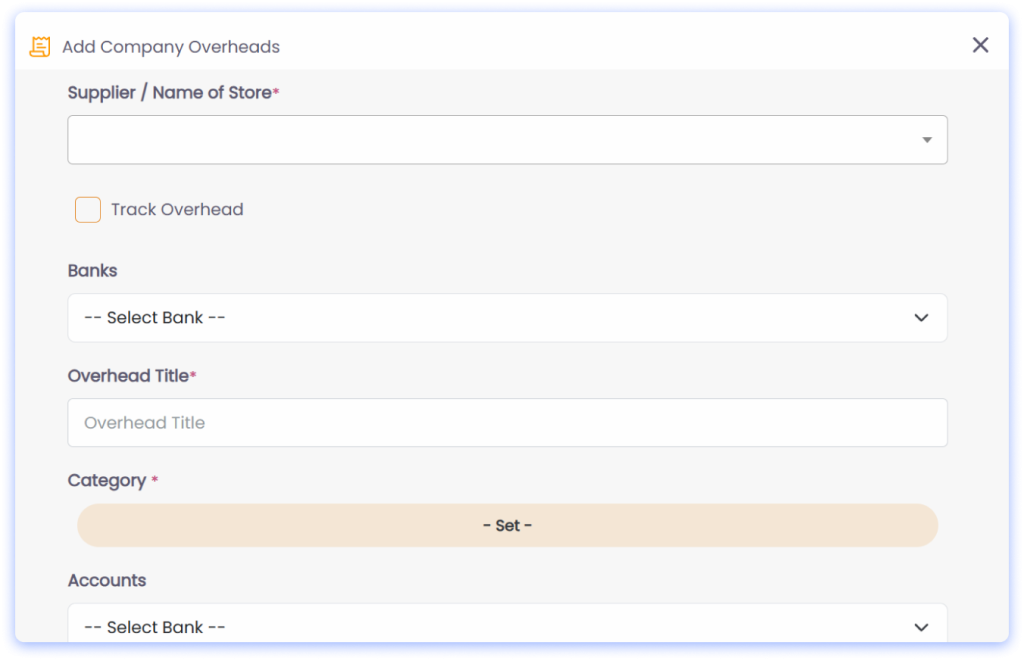
To address these challenges, we’ve introduced a feature that makes managing overheads easier than ever. Now, when you add receipts to CQ for business expenses like tools, petrol, or PPE, they can be pushed directly to your accounting software as a bill.
Here’s how it works:
Add Receipts to CQ: Log your overhead expenses in CQ under the "Overheads" category. These aren’t tied to specific jobs but to the business as a whole.
Push to Accounting Software: With a single click, these receipts are synced with your accounting software (Xero, QuickBooks, or Sage), creating a bill for seamless financial tracking.
Track in One Place: All your overhead expenses are stored and managed in CQ, giving you a comprehensive view of your business costs.
Why This Matters to Your Business
This feature offers several key benefits that can transform the way you manage your expenses:
Save Time: Eliminate the need for manual data entry. By pushing receipts directly to your accounting software, you can focus on growing your business instead of getting bogged down in admin work.
Improve Accuracy: Reduce errors caused by manual input, ensuring every expense is accounted for correctly.
Gain Better Financial Insight: With all your overhead expenses tracked and synchronized, you get a clearer picture of how these costs impact your profitability.
Stay Organized: Keep all receipts centralized in CQ, making it easier to access and manage your financial records when you need them.
Why CQ is Different
At CQ, we design features based on real-world challenges faced by landscapers. This overhead receipts integration is just one example of how we’re continuously evolving our system to help you work smarter, not harder.
By connecting CQ with Xero, QuickBooks, or Sage, we’re giving you the tools to simplify overhead management and ensure that no expense goes unnoticed.
Take Control of Your Overheads Today
Managing overheads doesn’t have to be a hassle. With CQ’s new feature, you can streamline your expense tracking, save time, and keep your finances in check—all in one place.
👉 Book a demo today to see how CQ can transform your business management. Let’s simplify your operations and help your landscaping projects thrive!
Managing documents is a necessary but often time-consuming task for landscaping businesses. Whether it’s work contracts for your team or agreements for multi-site jobs with clients, staying organized is a constant challenge. Documents get misplaced, information is hard to retrieve, and valuable time is wasted searching through files.
At CQ, we’re committed to simplifying your day-to-day operations. That’s why we’ve introduced a new feature that allows you to store documents directly within our system—organized by colleagues and clients. Let’s dive into how this feature works and why it’s a game-changer for your business.
The Challenges Businesses Face With Document management
For Colleagues
Managing staff documents is no small feat. Work contracts, PPE compliance records, certifications, and training documents often end up in various locations, both physical and digital. This disorganization can lead to significant problems:
Difficulty finding documents during audits or reviews.
Missing or misplaced safety compliance records, risking legal or operational issues.
Wasted time searching for files instead of focusing on your business.
For Clients
For landscaping businesses working with multiple sites or recurring clients, managing client documents can become overwhelming. Contracts, job specifications, and other essential paperwork need to be accessible at all times, but without a centralized system, it’s easy for things to go astray.
Lost or misplaced client agreements can delay projects.
Scattered records can create a disorganized client experience.
Missed opportunities to upsell or expand services due to incomplete records.
The Solution: CQ’s New Document Management Feature
To address these challenges, CQ’s new feature enables you to add and store documents directly within your system. This allows you to stay organized, save time, and focus on what matters most—running your business.
1. Adding Documents to Colleagues
This feature lets you store essential staff documents like:
Work contracts.
PPE compliance sheets.
Certifications and training records.
Key Benefits:
Centralized Storage: Keep all staff-related documents in one secure, easy-to-access location.
Compliance Made Easy: Ensure you’re always prepared for audits or legal requirements.
Time Savings: Quickly retrieve documents without digging through physical files or scattered folders.
2. Adding Documents to Clients
For your clients, this feature allows you to attach contracts, agreements, and job specifications directly to their profile in CQ.
Key Benefits:
Streamlined Organization: Have every client-related document in one place, ready to access at a moment’s notice.
Enhanced Professionalism: Impress clients with your organization and quick access to important details.
Seamless Project Management: Perfect for businesses handling multi-site jobs or recurring work, where accurate records are critical.
Why This Matters for Your Business
CQ’s new document management feature is more than just a storage solution—it’s a way to enhance your business operations: ✅ Save Time: Eliminate the hassle of searching through scattered files. ✅ Stay Compliant: Easily track and store necessary staff documents to meet legal and safety requirements. ✅ Boost Efficiency: Keep all documents tied to their relevant colleague or client, making access simple and fast. ✅ Enhance Client Experience: Provide a professional and organized approach to managing client relationships, especially for complex jobs.
See It in Action
With CQ, document management is easy and intuitive.
Want to see the full process? Check out our video walkthrough to see how you can upload, manage, and retrieve documents effortlessly.
Simplifying Your Business, One Feature at a Time
At CQ, we know that running a landscaping business comes with enough challenges—keeping track of important documents shouldn’t be one of them. Our new feature is designed to make your life easier by organizing everything in one place.
Whether you’re managing work contracts for your team or keeping client agreements organized, CQ’s document management feature ensures you’re always prepared.
👉 Ready to simplify your business operations? Book a free demo today and let’s chat about how CQ can help your business thrive.
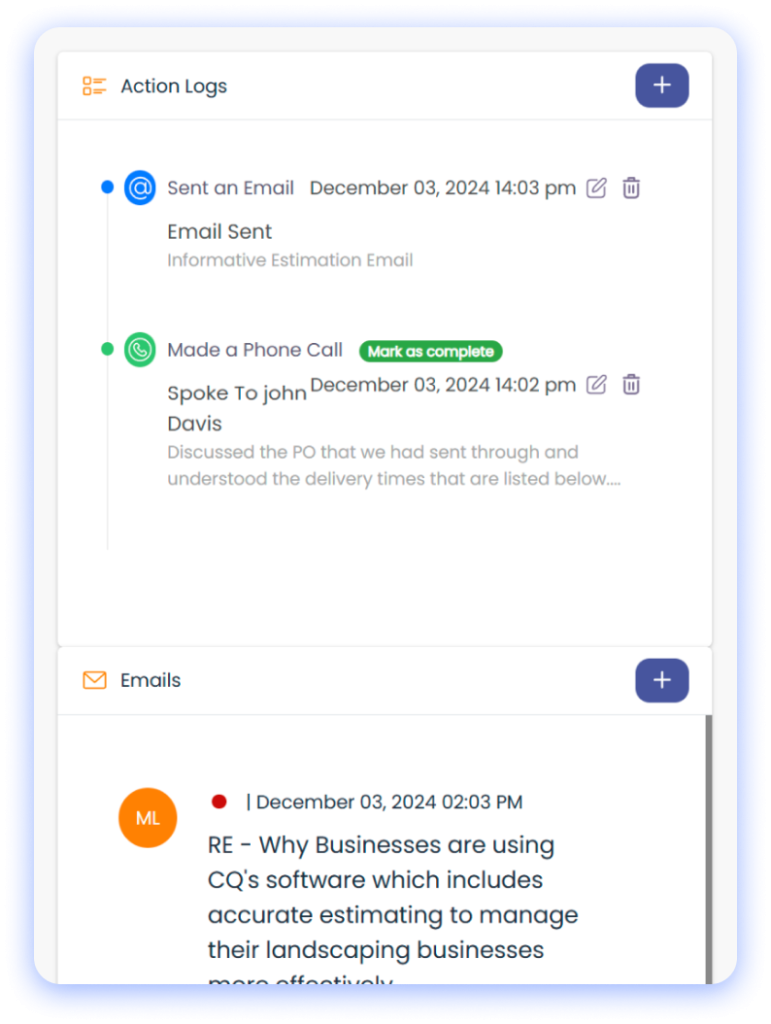
Effective communication is the backbone of any successful landscaping business. Whether it’s managing client relationships or coordinating with suppliers, every phone call, email, or meeting matters. Yet, keeping track of these interactions can be a monumental challenge—until now.
At CQ, we’ve developed a powerful new feature: action logs and email tracking. This update ensures that every interaction is logged, tracked, and easily accessible, creating clarity and accountability in your workflows. Let’s dive into how it works and why it’s a game-changer for landscapers.
The Communication Challenges Landscapers Face
For Jobs
Managing client communication can feel like juggling a dozen spinning plates:
Important details from emails, calls, and meetings get lost in the shuffle.
Follow-up tasks are forgotten, leading to delays and missed opportunities.
Information is scattered across different tools, making it hard to find when you need it.
For Suppliers
Dealing with suppliers brings its own set of challenges:
Conversations across multiple jobs blur together, creating confusion.
Clarifying past agreements or instructions becomes time-consuming.
A lack of centralized communication records leads to inefficiencies and misunderstandings.
How CQ’s Action Logs and Email Tracking Solve These Challenges
For Jobs: Centralized Communication Records
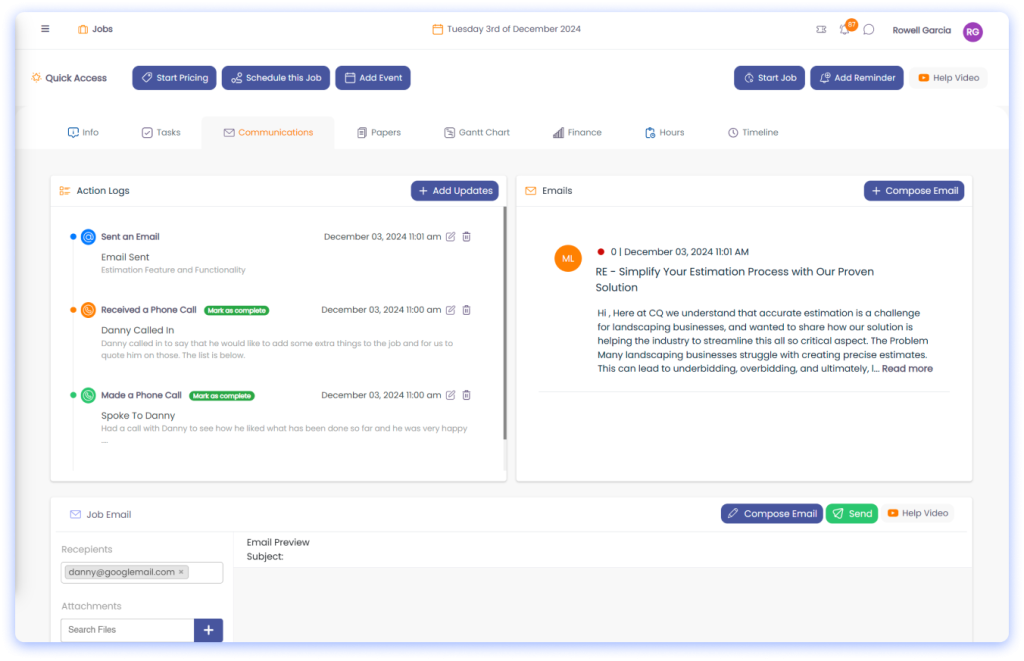
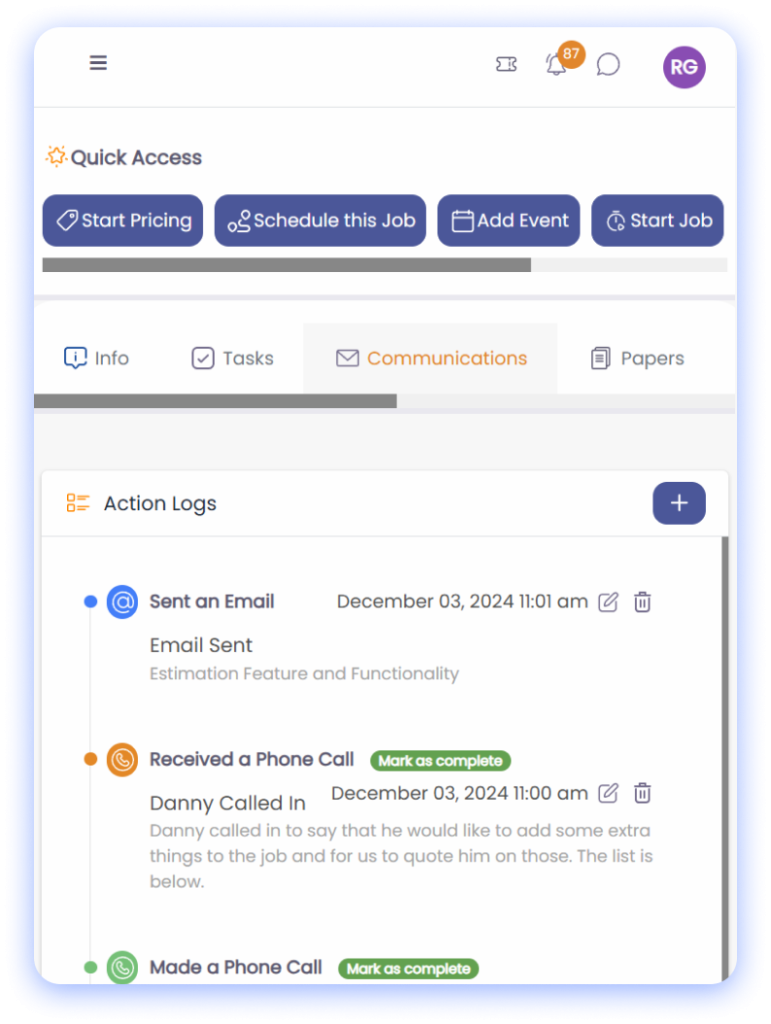
Log Every Interaction: Track calls, emails, meeting notes, and tasks in one place.
Assign and Follow Up: Assign tasks to team members, set reminders, and ensure nothing slips through the cracks.
Email Integration: Automatically track all sent and received emails, creating a clear and comprehensive history for each job.
For Suppliers: Simplified Collaboration
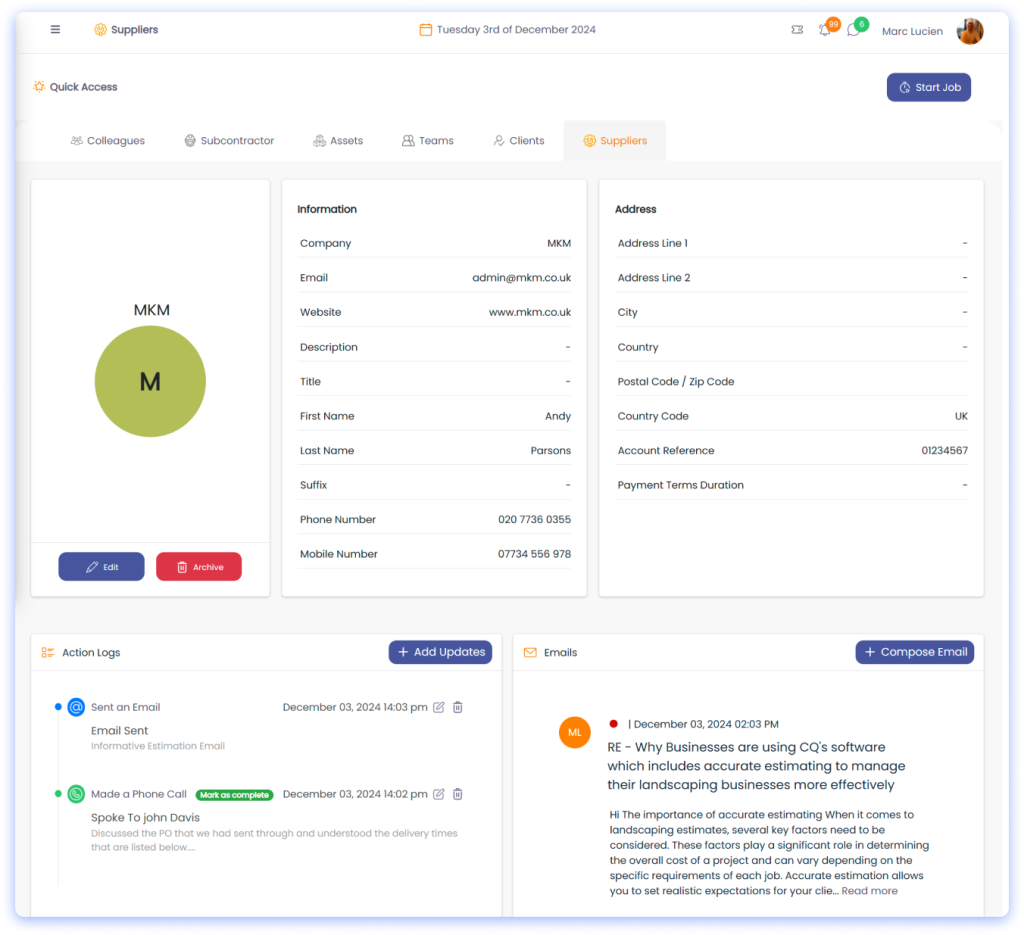
Log Supplier Interactions: Track discussions about material deliveries, pricing, and timelines across multiple jobs.
Create a Central Record: All communication with suppliers is stored in one place, making it easy to reference past conversations.
Resolve Disputes Faster: Clear logs provide evidence to quickly clarify misunderstandings or resolve issues.
Key Benefits of CQ’s Communication Tools
Enhanced Organization: No more digging through emails or searching for handwritten notes—everything is centralized and easy to access.
Increased Accountability: Assign follow-ups and track their progress, ensuring every task is completed on time.
Improved Collaboration: Teams can stay aligned by accessing shared communication logs, reducing miscommunication.
Transparency and Evidence: Maintain a clear, auditable trail of communication to resolve disputes or misunderstandings.
Time Savings: Spend less time searching for information and more time focusing on your business.
How It Works: A Walkthrough of the Features
Action Logs for Jobs
Imagine you’ve had a call with a client to discuss changes to a project timeline. Here’s how you’d log it in CQ:
Open the job’s action log.
Add a new entry: select “Call,” summarize the discussion, and assign a follow-up task to your project manager.
Set a reminder for the follow-up task.
Action Logs for Suppliers
Say you’ve spoken to a supplier about material deliveries for three upcoming jobs. Here’s how CQ simplifies it:
Log the call under the supplier’s profile, summarizing the key points discussed.
Attach the relevant job details to the entry.
Reference this log anytime you need clarity on what was agreed.
Email Tracking
All emails sent and received through CQ are automatically tracked. This means:
You can view the entire email thread directly within the system.
Incoming responses are linked to the relevant job or supplier.
Nothing gets lost, and you have a complete history at your fingertips.
Why CQ’s Communication Tools Matter for Your Business
Managing communication effectively is about more than just organization—it’s about transforming the way you work: ✅ Save Time: Stop searching for scattered information. Everything is stored in one place. ✅ Boost Accountability: Assign and track tasks to ensure follow-ups happen on time. ✅ Enhance Collaboration: Keep your team aligned with a centralized log of all interactions. ✅ Protect Your Business: Maintain an auditable trail of communication to resolve disputes quickly.
Smarter Communication for Smarter Landscaping
At CQ, we understand the importance of clear and organized communication. Our new action logs and email tracking tools are designed to eliminate the chaos and bring structure to your interactions—whether it’s with clients or suppliers.
Ready to revolutionize the way you manage communication?
👉 Book a free demo today to see how CQ can simplify your operations and help your landscaping business thrive.
## The scheduling problem for landscapers: what keeps managers awake
Scheduling in a landscaping business is deceptively hard. At first glance it’s about assigning crews to jobs. In reality it’s about managing uncertainty: weather, last-minute sickness, machinery breakdowns and shifting customer expectations. Those factors ripple through routes, materials and labour allocation, creating lost time, wasted fuel and missed margins.
This article analyses the four toughest scheduling challenges — weather delays, sick cover, equipment availability and the knock-on effects they create — and explains how connected workflows remove the guesswork. The prescriptions are practical and built for service teams that need to keep sites running, customers informed and costs visible.
### The four toughest scheduling challenges
- Weather delays
- Sick cover and last-minute labour shortages
- Equipment availability and maintenance conflicts
- The cascade effect on routes, materials and customer communications
Each looks straightforward until they collide on a Thursday morning when a cold snap follows heavy rain and a key ride-on mower fails. That’s when a single scheduling blind spot becomes multiple missed appointments and emergency overtime.
Weather is the perennial scheduling disruptor. Unlike factory work, landscaping is site-dependent. Soil conditions, frost and wind affect what can be done and how long it will take.
Problems that arise
- Jobs overrun because surfaces are softer or plant handling takes longer.
- Jobs are cancelled mid-route, leaving crews and machines idle miles from depot.
- Reactive rescheduling creates overtime and double handling.
Why standard tools fail
- Static schedules don’t incorporate short-term forecasts or site microclimates.
- Manual reallocation is slow; by the time you reassign a crew, disruptions have multiplied.
### 2. Sick cover: small teams, big impact
Landscaping teams are often lean. Losing a single operative can reduce a crew’s capacity by one-third or more.
Practical consequences
- A team without a driver or machine operator cannot be productive.
- Skilled tasks can’t be completed by general operatives without supervision.
- Temporary hires are costly and unfamiliar with your equipment and processes.
What managers tell us
- In practice, many service businesses tell us that last-minute staffing gaps are the single biggest cause of emergency rescheduling.
### 3. Equipment availability: the silent bottleneck
Equipment availability is not just about owning machines; it’s about knowing where they are, when they are due for maintenance and whether a substitute exists.
Typical failures
- A key machine is unavailable because it’s still at a different site.
- Preventive maintenance is scheduled without coordinating with planned jobs.
- Spare parts delays ground machines for days.
Why this matters
- Equipment-related downtime directly reduces billable hours.
- Substituting the wrong machine increases labour time and degrades quality.
### 4. Cascading problems: routes, materials and customer experience
These issues don’t exist in isolation. A scrapped job means materials aren’t used, inventory is misreported, and customers are left uninformed.
Operational impacts
- Routes become inefficient as schedulers scramble to reassign crews.
- Customer-facing teams field repeated calls, increasing admin time.
- Profit margin erodes through unbilled travel and overtime.
Working with growing service businesses, we often see the same chain reaction: one delay fuels another until the whole day is compromised.
## Why traditional scheduling methods break down
Paper, spreadsheets and disconnected apps have limited situational awareness. They require manual updates at multiple touchpoints and depend on perfect human coordination. When conditions change, those tools amplify friction instead of reducing it.
Common shortfalls
- No single source of truth: scheduling, time sheets and equipment logs live in different systems.
- Delays in communication: crew updates arrive hours after an issue occurs.
- No automation to triage problems: every reschedule is manual.
The result is inefficient labour allocation, underused equipment and poor customer communications. That’s not a technology problem alone — it’s an operational visibility problem.
## How connected workflows solve the toughest problems
Connected workflows are not just integration; they are purpose-built sequences that keep information flowing between teams, machines and customers in real time. Connected workflows create operational visibility across crews, equipment and sites.
What “connected workflows” do in practice
- They create a single, up-to-date record of job status, crew location, equipment usage and customer notes.
- They automate decision rules: for example, if a mower fails, reassign the nearest crew with compatible equipment and notify the customer automatically.
- They break silos between office schedulers, field crews and planners so changes are visible and actionable immediately.
Below are concrete ways connected workflows address each of the four challenges.
### Solving weather-related disruption
- Use real-time weather feeds at site level so jobs are flagged early when conditions change.
- Automate conditional rules (e.g., if heavy rain predicted, defer replanting and shift crews to hard landscaping tasks).
- Re-prioritise work based on site readiness and crew proximity.
Impact
- Fewer same-day cancellations.
- Reduced driving time because reassignment happens before crews leave depot.
- Better material planning and less spoilage for plant deliveries.
### Covering sick leave without collapsing the day
- Maintain a live skill and availability roster linked to scheduling.
- Automate short-notice replacement rules: identify qualified staff in the area and suggest reassignments.
- Enable rapid approval workflows for overtime or temporary hires when required.
Impact
- Faster, safer cover with the right skill set.
- Lower emergency recruitment costs.
- Less supervisory overhead because the system reduces guesswork.
### Managing equipment availability and maintenance
- Track equipment location, operating hours and maintenance schedules in the same workflow as jobs.
- Use alerts to prevent scheduling a machine that’s due for service.
- Maintain a spare-equipment pool and automated rotation rules to balance utilisation.
Impact
- Higher utilisation of machines with fewer breakdowns.
- Reduced event-driven maintenance and fewer cancelled jobs.
- Accurate costing per job because equipment hours are recorded automatically.
### Preventing cascade effects
- Route optimisation and dynamic re-routing minimise travel after a change.
- Automated customer notifications reduce inbound queries and improve reputation.
- Inventory updates tied to job completion prevent stock mismatches and material delays.
Impact
- Lower fuel and travel costs; better punctuality.
- Better customer communication, fewer complaints.
- Clear, auditable records for billing and compliance.
## Practical steps to implement connected workflows in your team
Start with clear objectives: reduce travel, cut emergency overtime, improve first-time completion rates. Then follow these steps.
1. Establish your single source of truth
- Consolidate job schedules, crew availability and equipment logs into one system.
- Remove duplicate spreadsheets and manual hand-offs.
2. Define your conditional rules
- Create explicit rules for weather delays, sick cover and equipment failure.
- Make the rules small and testable so they can be refined quickly.
3. Give crews real-time tools
- Mobile updates and photos from site feed directly into scheduling.
- Immediate visibility reduces call‑and‑reply delays.
4. Automate customer communications
- When a job is delayed or reassigned, the system sends an update with the new ETA.
- Reduce manual calls and admin time.
5. Monitor and tweak
- Use simple KPIs: travel hours, emergency overtime, first-time completions.
- Iterate the rules and workflows based on measured outcomes.
In practice, many service businesses tell us it’s the combination of automation and frontline transparency that delivers results, not any single feature.
## The software side: what to look for
When assessing software, prioritise these capabilities:
- Live scheduling with drag-and-drop reassignments
- Equipment and maintenance tracking tied to jobs
- Mobile field updates and photo capture
- Automated rules and notifications
- Route optimisation and costed schedules
- Clear audit trails for billing and compliance
For an overview of core capabilities and a checklist to evaluate vendors see https://www.cq-business-management-software.com/how-to-choose-job-management-software/. If you want to compare product features and support models, CQ Business Management Software’s main page is a practical place to start: https://www.cq-business-management-software.com/.
If you’d prefer to see how these workflows work for landscapers, a focused walkthrough can make the decisions easier: try the landscaping demo at https://www.cq-business-management-software.com/landscaping-demo/.
## Quick case-level examples
- Weather reroute: A team scheduled for turf laying is reassigned automatically when heavy rain is detected. Crews pick up hedge trimming jobs instead; materials for turf are rescheduled and the customer is informed.
- Sick cover: A machine operator calls in sick. The system identifies an operator nearby authorised to use the machine type and reassigns them, prompting a supervisor approval. No truck leaves depot empty.
- Equipment failure: A ride-on mower reports a fault via the mobile app. The system blocks further assignments for that machine, suggests an alternative mower and updates the job cost estimate.
These are procedural changes, not wishful thinking. They require setting up rules and training teams to use the tools consistently.
## Final point: make visibility part of your operating rhythm
Operational issues won’t disappear, but you can reduce their frequency and impact. Connected workflows create operational visibility that lets you make proactive decisions rather than firefighting.
If you want a short, practical demo that maps these workflows to your day-to-day operations, the landscaping demo shows these patterns in a real-world context: https://www.cq-business-management-software.com/landscaping-demo/. For guidance on choosing a system that fits your scale and processes, use the how-to-choose checklist: https://www.cq-business-management-software.com/how-to-choose-job-management-software/.
Takeaway: start by removing information gaps. Give schedulers, crews and planners the same live picture of jobs, people and machines. Do that and the biggest scheduling risks — weather, sickness and equipment failures — stop being surprises and become manageable events.
Boosting Your Bottom Line
In the competitive world of landscaping, achieving sustainable growth goes hand in hand with maximizing profits. Yet, many landscaping businesses struggle to navigate the financial challenges that come with fluctuating demand, rising costs, and the constant pressure to stay ahead of the competition. The key to overcoming these challenges? Implementing effective profit maximization strategies with the help of advanced business management software.
Understanding Profit Maximization
Profit maximization isn't just about increasing revenue; it's about strategically managing your resources to ensure that every dollar spent contributes to your bottom line. For landscaping businesses, this means finding the perfect balance between cost control, operational efficiency, and customer satisfaction.
Effective Cost Management
One of the first steps toward profit maximization is effective cost management. By closely monitoring expenses and identifying areas where costs can be reduced without compromising quality, landscaping businesses can significantly improve their profitability. Advanced software solutions offer real-time expense tracking and analytics, providing insights that can lead to more informed cost-saving decisions.
Upselling Landscaping Services
Another powerful strategy is upselling additional services to existing clients. Whether it's offering seasonal planting services or suggesting a regular maintenance plan, upselling can significantly increase revenue. Business management software can help identify upselling opportunities, manage follow-ups, and track the success of these initiatives.
To truly maximize profits, landscaping businesses must understand their financial performance inside and out. Business management software with robust analytics and reporting features can provide critical insights into financial health, helping identify areas for improvement and growth opportunities.
Identifying Growth Opportunities
Finally, profit maximization is about looking forward. By analyzing market trends and customer feedback, landscaping businesses can identify new services or markets to explore. Software solutions that offer market analysis and customer feedback tools can be instrumental in spotting these opportunities.
The Path to Increased Profitability
Maximizing profits in the landscaping industry requires a strategic approach to cost management, operational efficiency, and customer relations. By leveraging the right business management software, landscaping businesses can not only navigate the challenges of today's market but also pave the way for future success.
Take Action Today
Ready to transform your landscaping business's financial performance? Explore our landscaping business management software and discover how it can help you implement these profit maximization strategies. Sign up for a demo or trial today and take the first step towards boosting your bottom line.