## Why scheduling still causes chaos for landscapers and field service teams
Scheduling looks simple on paper: assign a job, send a crew, finish the work. In practice it is chaotic. Jobs change mid-day, crews run late, parts are missing, customers call to complain, and admin spends hours reconciling timesheets and invoices. For landscapers and wider field service teams, that chaos is a steady drain on profit and morale.
Common symptoms your team will recognise:
- Double-booked crews or duplicate job entries.
- Frequent phone-based reassignments and last-minute changes.
- Long travel times from poor route planning.
- Paper job sheets that never make it back to the office on time.
- Late invoices and slow cash collection.
The real problem is organisational: information is fragmented across spreadsheets, whiteboards, phone calls and siloed apps. Without a single source of truth, your team is firefighting rather than delivering predictable service.
## Why fragmented tools fail scheduling
Fragmented processes amplify small errors into operational breakdowns. A few typical failure modes:
- Manual scheduling relies on memory and guesswork. One missed call becomes a missed appointment.
- Separate systems for quotes, jobs, timesheets and invoicing create latency — by the time the accounts team sees the job, the customer has paid someone else.
- Mobile teams working offline create a data gap between what happens on site and what the office knows.
- Lack of location-based logic ignores travel and resource constraints when allocating work.
These failures are not hypothetical. Working with growing service businesses, we often see a pattern: the scheduler spends most of the day answering calls instead of planning, crews wait for parts, and profitable work is left undone because capacity was never visible.
## The true cost of poor scheduling
When scheduling is chaotic, the cost is measurable and recurring:
- Time wasted: every reactive call and unsynchronised update costs billable hours.
- Fuel and labour waste: inefficient routing and idle time inflate job costs.
- Customer churn: missed appointments and poor communication reduce repeat business.
- Low staff retention: crews frustrated by poor planning move on.
- Slower cashflow: delays between job completion and invoicing increase DSO (days sales outstanding).
If you add these up across a month, the impact on margins and growth is substantial. Fixing scheduling isn’t a productivity nicety — it directly protects revenue.
## What connected scheduling actually means
Connected scheduling links the elements you already use — jobs, crews, vehicles, parts, timesheets and invoices — into a single, live system. It removes manual hand-offs and brings operational data into one place where the office and field access the same information in real time.
Connected workflows create operational visibility
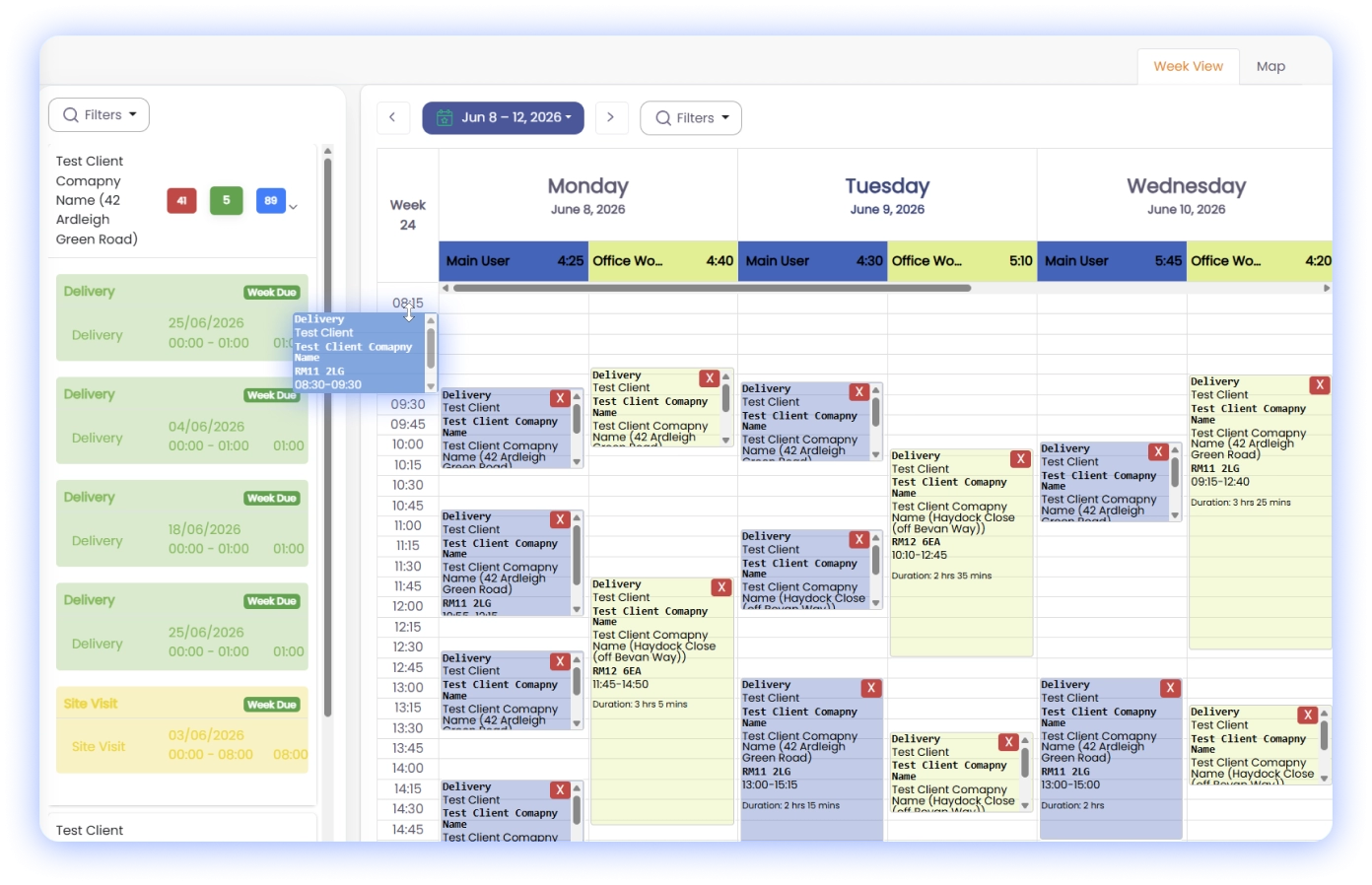
That visibility changes how decisions are made: dispatchers can see who is nearest, who has the right skills or parts, and which jobs can be reshuffled with minimal disruption. Your team moves from reacting to planning.
## Key components of an effective connected schedule
A robust connected scheduling approach includes these capabilities:
- Real-time job status: updates move from the field to the office the moment a task changes.
- Drag-and-drop visual scheduler: planners can reassign jobs while seeing the impact on routes and workloads.
- Route optimisation: schedules factor in travel time and cluster jobs to reduce mileage.
- Skills and resource matching: assign technicians based on qualifications and equipment needs.
- Parts and inventory tracking: avoid wasted trips when parts are missing by holding stock visibility.
- Mobile job sheets and photos: on-site evidence and notes synchronise automatically.
- Integrated timesheets and invoicing: close the loop from completion to billing without duplicate entry.
- Notifications and confirmations: customers and crews receive automated updates to reduce calls.
Each of these elements is necessary. Together they prevent the cascade of errors that creates chaos.
## How connected scheduling removes the daily firefight
Here’s how an organised, connected system changes daily operations:
- Reduce double-bookings: live availability prevents overlapping jobs.
- Cut calls and interruptions: crews update jobs on the move and the office doesn’t rely on voicemail.
- Optimise travel and increase utilisation: route planning and job clustering free up technician time.
- Improve first-time fix rates: skills and parts matching ensure the right person brings the right kit.
- Speed up billing: automated timesheets and job data feed invoices immediately, shortening cashflow cycles.
The shift is practical and incremental. You do not need a perfect system overnight — start by removing the biggest friction points and build process discipline around the data.
## Practical steps to implement connected scheduling in your business
If you’re evaluating solutions or thinking about a process change, follow a structured approach:
1. Map your current flow: document how a job moves from lead to invoice today.
2. Identify high-impact failures: which problems cost the most time or money?
3. Standardise job data: make sure each job has the same required fields (address, access notes, parts, skills).
4. Introduce a single scheduling tool: consolidate job information into one platform your team uses every day.
5. Train the team on the new process: change succeeds with clear roles and consistent use.
6. Measure and iterate: track missed appointments, travel hours and invoice times to prove impact.
In practice, many service businesses tell us the biggest gains come from enforcing one point of truth and using that data to drive dispatch decisions.
## Choosing technology that enforces connected scheduling
When selecting software, prioritise platforms that provide a single view of operations and remove duplicate entry.
If you need a framework for evaluating providers, our short guide explains what to look for when selecting job management software: https://www.cq-business-management-software.com/how-to-choose-job-management-software/
A few specific selection criteria:
- Does the system offer a visual scheduler with drag-and-drop rescheduling?
- Can it calculate travel time and optimise routes automatically?
- Are mobile updates immediate and bi-directional?
- Is parts and inventory management incorporated?
- Does it link job completion directly into invoicing without manual transfer?
Answering these questions will separate tools that create more work from those that reduce it.
## Seeing connected scheduling in a landscaper’s workflow
A typical landscaper’s day after applying connected scheduling:
- Morning: the scheduler assigns jobs based on proximity, kit on vans and technician skills.
- Midday: a crew updates a job as “materials required”; the system reassigns jobs for nearby crews who have parts in stock.
- Afternoon: completed jobs sync photos and signatures; timesheets and job costs flow straight into the accounts ledger.
- End of day: managers review utilisation reports and mileage, not lost timesheets.
If you want to explore a real example tailored to groundscare and horticultural teams, you can try the landscaping demo to see these features in context: https://www.cq-business-management-software.com/landscaping-demo/
## What to measure to prove the change
Track these metrics to confirm your scheduling improvements:
- Appointment adherence rate (arrivals on time).
- Average travel time per job.
- First-time fix rate.
- Jobs completed per crew per day.
- Time from job completion to invoice.
Improvement in these KPIs is tangible evidence that connected scheduling is ending the chaos, not just rearranging it.
## Getting started without disruption
You do not need to rip and replace everything to get the benefits. Start with:
- A pilot on a single team or region.
- Clear success criteria for the pilot (e.g., reduce travel by 15%).
- Simple data migration of active jobs and recurring clients.
- Focused training for dispatchers and field teams.
If you want a closer look at a platform that centralises scheduling, job management and billing into one system, review the product details here: https://www.cq-business-management-software.com/. Evaluating a live demo will show how the theory maps to your daily operations.
## Final takeaway
Chaos in scheduling is not an inevitable cost of field work — it is the predictable outcome of disconnected processes. By organising data, enforcing a single source of truth and using scheduling tools that reflect real-world constraints, your team can stop firefighting and start delivering consistent, profitable service.
Connected scheduling is an operational control, not a cosmetic upgrade. Start by mapping the failures, prioritise the high-impact fixes, and measure results. The transition takes discipline, but the payoff is visible: fewer missed appointments, lower operating costs, and faster cashflow.